What are Service Tasks & How Do I Manage Them?
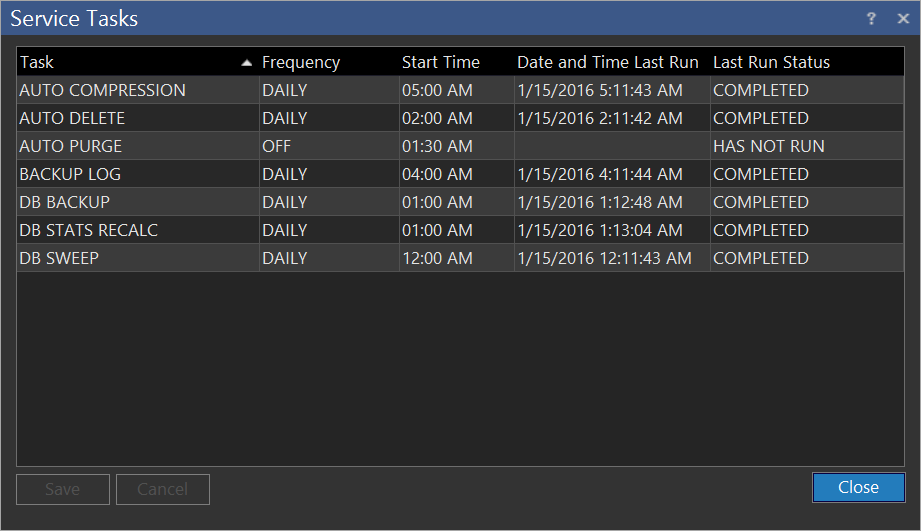
Service tasks are the background tasks performed by the RamSoft Tasks Service. Although the user has the option to disable these tasks, allowing them to run during off hours is strongly recommended. These tasks organize the image data and provide optimal performance of the database. To access the service task menu select Settings > Server Settings > Service Tasks.
The Frequency column in the Service Task menu has two possible values for each task. The task can be run Daily, or it can be switched Off. The Start Time column indicates the scheduled time for each task. The Date & Time Last Run column displays the date and time of each task since its last execution. The time of execution might differ from the Start Time as the RamSoft Tasks Service only runs periodically. At its scheduled time, the Task service determines and executes any tasks which have not been completed within the past twelve hours. The execution interval of the RamSoft Tasks Service is defined by the DICOM Service Timer value in Maintenance.
This menu is useful in scheduling any tasks and in monitoring their successful completion. The Last Run Status column describes the completion status for the last execution of each task. The possible values are COMPLETED, HAS NOT RUN and FAILED. If the execution of any of the tasks has failed, the System Log should be consulted to find out more details about the problem.
The DB Sweep task optimizes database indexes and removes references to deleted entries. It is somewhat similar to the Windows de-fragment task. Running it periodically will keep the database error free and at its optimized performance.
The DB Backup task creates a set of database backup files (.GBK files) which may be later copied to a network folder or to removable media. These files can be used to restore the database in the event of a crash or corruption. This task should be run daily to maintain the best possible disaster recovery resources. The task creates one backup file for every day of the week, for a total of eight backup files named pacs0.gbk - pacs7.gbk. These files are stored in the Database Backup Folder, the location of which is defined in Maintenance.
The Auto Delete task purges DICOM objects when the server's storage is full. The least used studies are removed first. Auto Delete does not delete studies that are on the Transmit List. This task will only run if the disk usage watermarks established in the Disk Management section of Maintenance are reached. The task may be disabled if the server is a primary archive device and contains sufficient capacity to store all DICOM objects.
The Auto Purge task deletes study objects based on user-defined rules. After establishing the rules in Maintenance, the system will purge the studies matching the criteria.
The Backup Log task extracts any entries in the System, Communication, HL7, Transmit or Request logs and exports them to CSV (comma separated values) files. Once exported, the entries are then deleted from the database. The backup log task uses a path and time set by the administrator, through the Maintenance program, to specify the location of stored CSV files and the time when the task would be run. The CSV files can be viewed and searched by opening them in a program which recognizes the CSV format, such as Microsoft Excel.
The DB STATS RECALC task activates the procedure responsible for calculating Mirth HL7 DB Statistics.
The AUTO COMPRESSION task determines how the Rule Based Compression service in Maintenance is run periodically.