RapidResults Interface
RapidResults has an intuitive interface. It provides centralized access to the Image Viewer, Reports and Study Information.
This section provides you with information about the features of the application. The functionality of this application are controlled in the Navigation menu, Image toolbar, and Study toolbar.
RapidResults application is developed for both desktop and palmtop users. Though the targeted audiences are the same, accessing the application differs based on their comfort level and their schedule. The RapidResults application is customized to suit both access types.
For both access types, the application opens the My Latest Exams page by default upon successful login. It displays a list of all latest studies that are accessible by the current user. My Latest Exams page when in Desktop mode appears as shown below.
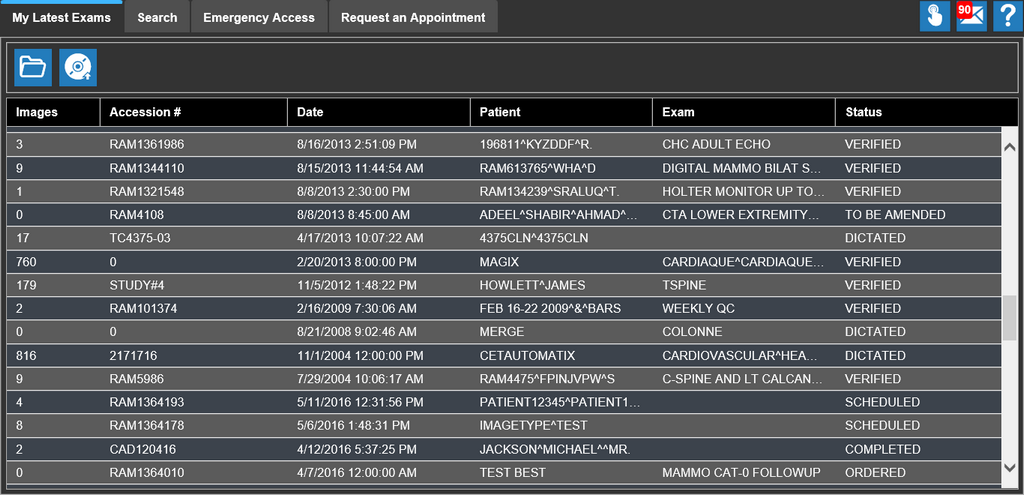
This page has four tabs. They are:
- My Latest Exams - To view the worklist
- Search - To explore a study
- Emergency Access - Provides reading physicians with an easy and immediate access to patient's study details
- Request an Appointment - To place an appointment request
Touchpad / touchscreen users
The application is developed for both desktop and palmtop users. Upon successful login, the application displays My Latest Exams page. The desktop user  icon appears on the right top corner and main menu
  icon the top left corner of the application. If these icons appear, it denotes that application is in palmtop mode.