How Do I Setup Email Settings?
The RamSoft software allow reports to be sent through Email. In order to set up the Email connection, the SMTP server settings must be set up and a template must be created. The Email Settings can be accessed from Communication > Email Settings menu.
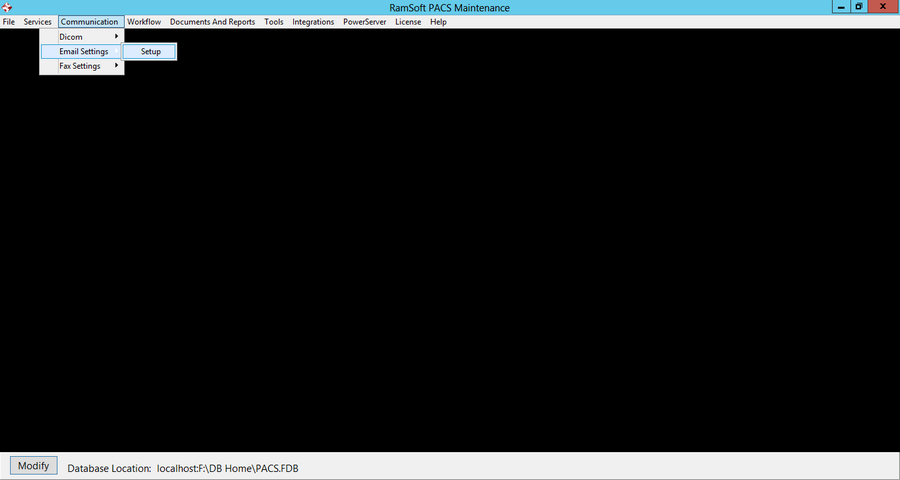
To setup the SMTP server, go to Communication > Email Settings > Setup.
An Email setup window is displayed:
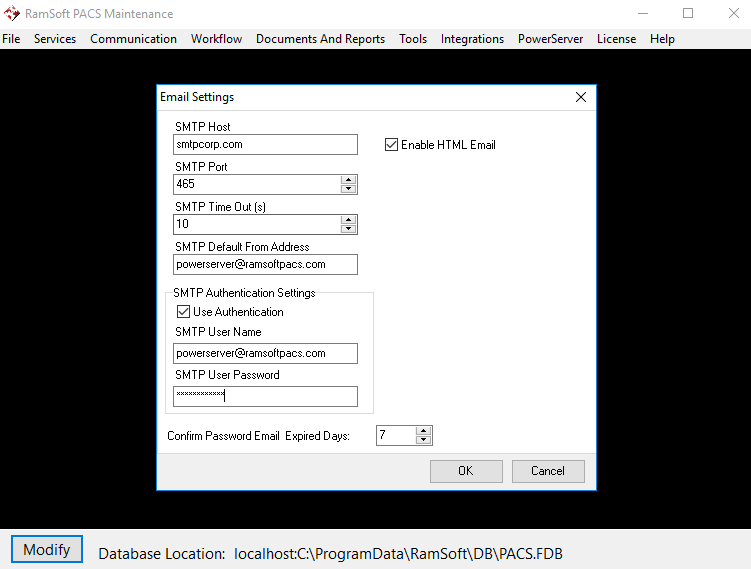
| Field | Description |
|---|---|
| SMTP Host | The address of the SMTP Host. For example, for Gmail, input smtp.gmail.com |
| SMTP Port | The port number for the SMTP server. Most SMTP servers use port 25 |
| SMTP Time Out (s): | The number of seconds before the connection is considered as Timed Out |
| SMTP Default From Address | The default sender's email address |
| Use Authentication | Select this option if SMTP server requires authentication |
| SMTP User Name | The user name used to authenticate with the SMTP server |
| SMTP User Password | The password associated with the user name |
| Enable HTML Email | Select if HTML emails are to be sent. If this option is not selected, only plain text emails will be sent. |
| Email report As: | Allows the report to be sent as either an Attachment or as Hypertext to the Physician. |
| Confirm Password Email Expired Days: | The time period before the "Confirm Password" email expires. |