How Do I Manage DICOM Setup?
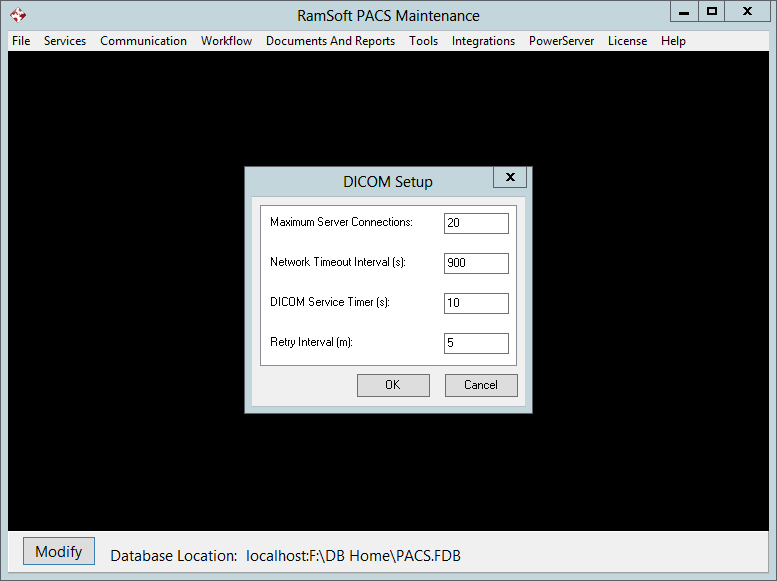
The DICOM Setup dialog contains more advanced configuration options for the DICOM service. These options do not have to be modified for the system to run properly.
To access the DICOM Setup menu:
- Select Communication - DICOM > DICOM Setup.
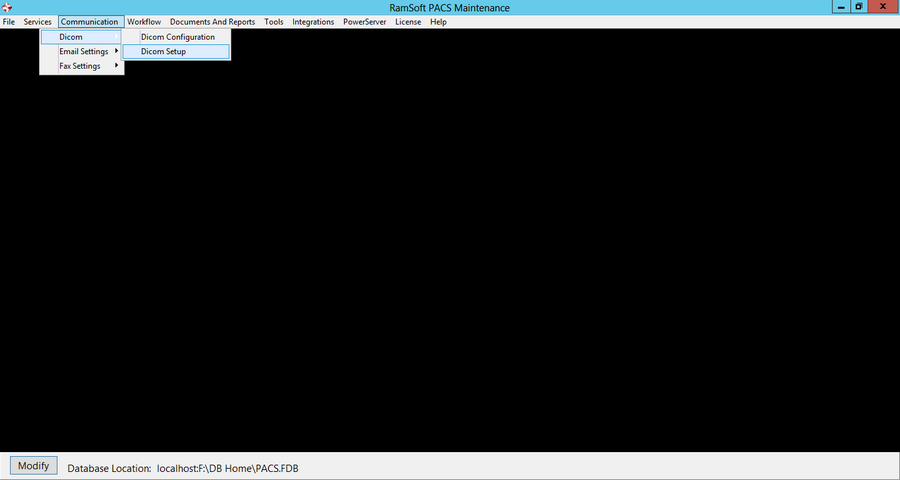
- This will open the DICOM Setup window.
-
The Maximum Server Connections value refers to the maximum number of DICOM stations that RamSoft PACS will receive from simultaneously. The default value is 10.
-
The Network Timeout Interval (s): refers to the amount of time RamSoft PACS will wait between packets before it considers a connection dead and drops the association.
-
The DICOM Service Timer (s): is the frequency with which the DICOM service polls the RamSoft PACS database to determine if there is any data that has been requested or needs to be sent out. By default this value is set to 30 seconds.
-
The Retry interval (hr): refers to the amount of time that the DICOM service will wait before retrying the transmission of a study that has reached the status of Too Many Failures.