How Do I Setup Editable Fields?
The software provides a way of preventing editing of specific fields by users. The maintenance module provides the option of allowing / blocking editing of certain specific fields from the Editable Fields Setup. The set up is accessible through Workflow > Editable Fields > Setup option.
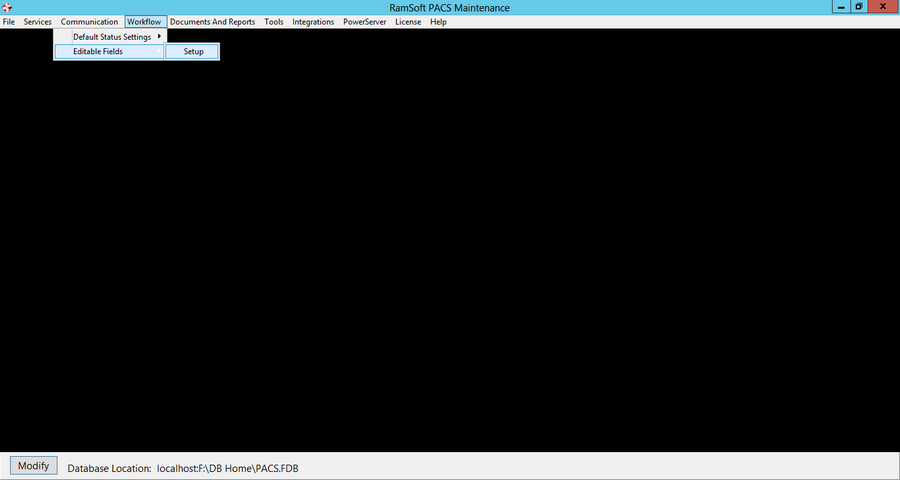
Clicking the Setup option will open the Editable Field Setup form.
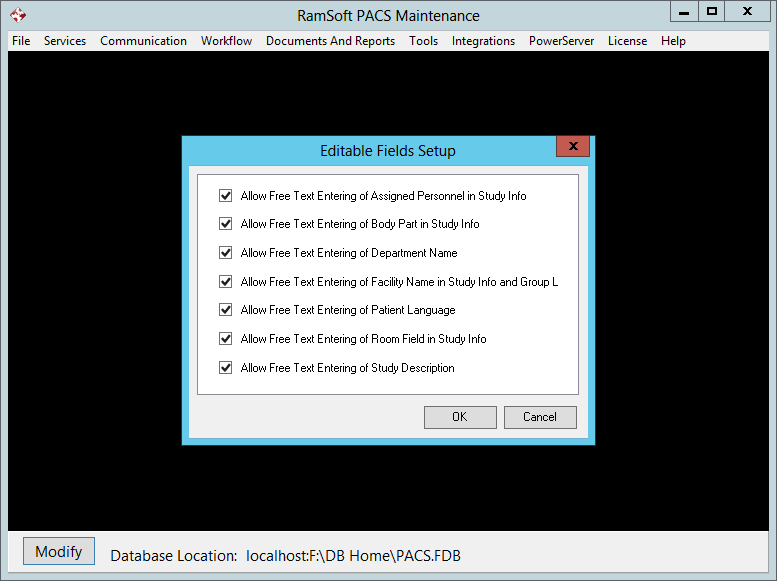
The Editable Fields Setup window has seven options:
-
The Allow Editing of Facility Name in Study Info and Group List when unchecked, prevents users from making changes to the name of the Imaging Facility in the Study Info form.
-
When Allow Editing of Room Field in Study Info is unchecked, users cannot make changes to the Room field in the Study Info form.
-
If the Allow Editing of Body Part in Study Info option is unchecked, it prevents users from making changes to the Body Part field in the Study Info form.
-
If the Allow Editing of Assigned Personnel in Study Info option is unchecked, it prevents users from changing the Assigned Personnel in the Study info form.
-
If the Allow Free Text Entering of Department Name is unchecked, it prevents users from making changes to the Department name of a facility.
-
If the Allow Free Text Entering of Patient Language is unchecked, it prevents users from making any changes to the Patient Language field in the Patient Info form.
-
If the Allow Free Text Entering of Study Description is unchecked, it prevents users from making any changes to the Study description field in the Study Info form.