Custom Scripting
Custom Scripting is accessed by going to Settings > Server Settings > Station List, selecting the Receive tab for the desired DICOM station and clicking on the Custom Scripting button.
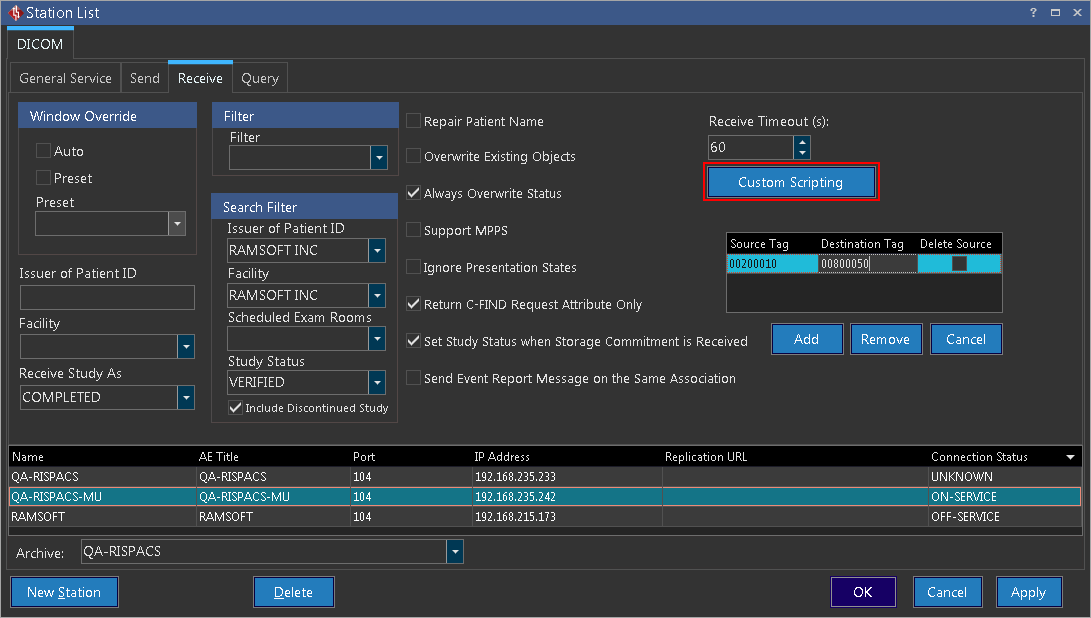
Clicking on the Custom Scripting button opens up the Script Editor window.

The Script Editor window allows the ability to create custom scripts to modify the DICOM object being received from the selected station. The Script Editor utilizes Pascal scripts. The following is a list of available functions to use when creating custom scripts:
Read Functions
function ReadTagString(const TagGroup, TagAttribute: Word; var ReturnValue: string): Boolean;
- Description: Call ReadTagString to read a specific attribute tag in a Dicom Object as string and returns a Boolean status.
- Parameters: TagGroup specifies the tag group in hexadecimal format. TagAttribute specifies the tag element in hexadecimal format. ReturnValue specifies the return value as a string.
function ReadTagUint16(const TagGroup, TagAttribute: Word; var ReturnValue: Uint16): Boolean;
- Description: Call ReadTagUint16 to read a specific attribute tag in a Dicom Object as an unsigned 16bit integer and returns a Boolean status.
- Parameters: TagGroup specifies the tag group in hexadecimal format. TagAttribute specifies the tag element in hexadecimal format. ReturnValue specifies the return value as an unsigned 16bit integer.
function ReadTagUint32(const TagGroup, TagAttribute: Word; var ReturnValue: Uint32): Boolean;
- Description: Call ReadTagUint32 to read a specific attribute tag in a Dicom Object as an unsigned 32bit integer and returns a Boolean status.
- Parameters: TagGroup specifies the tag group in hexadecimal format. TagAttribute specifies the tag element in hexadecimal format. ReturnValue specifies the return value as an unsigned 32bit integer.
function ReadTagFloat64(const TagGroup, TagAttribute: Word; var ReturnValue: Float64): Boolean;
- Description: Call ReadTagFloat64 to read a specific attribute tag in a Dicom Object as a 64bit float and returns a Boolean status.
- Parameters: TagGroup specifies the tag group in hexadecimal format. TagAttribute specifies the tag element in hexadecimal format. ReturnValue specifies the return value as a 64bit Float.
function ReadTagSint16(const TagGroup, TagAttribute: Word; var ReturnValue: Sint16): Boolean;
- Description: Call ReadTagSint16 to read a specific attribute tag in a Dicom Object as a signed 16bit integer and returns a Boolean status.
- Parameters: TagGroup specifies the tag group in hexadecimal format. TagAttribute specifies the tag element in hexadecimal format. ReturnValue specifies the return value as a signed 16bit integer.
function ReadTagSint32(const TagGroup, TagAttribute: Word; var ReturnValue: Sint32): Boolean;
- Description: Call ReadTagSint32 to read a specific attribute tag in a Dicom Object as a signed 32bit integer and returns a Boolean status.
- Parameters: TagGroup specifies the tag group in hexadecimal format. TagAttribute specifies the tag element in hexadecimal format. ReturnValue specifies the return value as a signed 32bit integer.
function ReadTagStringArray(const TagGroup, TagAttribute: Word; var ReturnValue: TStringArray): Boolean;
- Description: Call ReadTagStringArray to read a specific attribute tag in a Dicom Object as an array of strings and returns a Boolean status.
- Parameters: TagGroup specifies the tag group in hexadecimal format. TagAttribute specifies the tag element in hexadecimal format. ReturnValue specifies the return value as an array of strings.
function ReadTagDecimalStringArray(const TagGroup, TagAttribute: Word; var ReturnValue: Float64Array): Boolean;
- Description: Call ReadTagDecimalStringArray to read a specific attribute tag in a Dicom Object as an array of strings and returns a Boolean status.
- Parameters: TagGroup specifies the tag group in hexadecimal format. TagAttribute specifies the tag element in hexadecimal format. ReturnValue specifies the return value as an array of 64bit float.
function ReadTagDecimalString(const TagGroup, TagAttribute: Word; var ReturnValue: Float64): Boolean;
- Description: Call ReadTagDecimalString to read a specific attribute tag in a Dicom Object as a string and returns a Boolean status.
- Parameters: TagGroup specifies the tag group in hexadecimal format. TagAttribute specifies the tag element in hexadecimal format. ReturnValue specifies the return value as a 64bit float.
function ReadTagIntegerString(const TagGroup, TagAttribute: Word; var ReturnValue: Sint32): Boolean;
- Description: Call ReadTagIntegerString to read a specific attribute tag in a Dicom Object as a string and returns a Boolean status.
- Parameters: TagGroup specifies the tag group in hexadecimal format. TagAttribute specifies the tag element in hexadecimal format. ReturnValue specifies the return value as a signed 32bit integer.
function ReadTagIntegerStringArray(const TagGroup, TagAttribute: Word; var ReturnValue: Sint32Array): Boolean;
- Description: Call ReadTagIntegerStringArray to read a specific attribute tag in a Dicom Object as an array of strings and returns a Boolean status.
- Parameters: TagGroup specifies the tag group in hexadecimal format. TagAttribute specifies the tag element in hexadecimal format. ReturnValue specifies the return value as an array of signed 32bit integer.
function ReadTagSequence(const TagGroup, TagAttribute: Word; const SequenceNumber: Word; var ReturnValue: TRSDicomObjectScriptable): Boolean;
- Description: Call ReadTagSequence to read a specific attribute tag in a Dicom Object as a sequence and returns a Boolean status.
- Parameters: TagGroup specifies the tag group in hexadecimal format. TagAttribute specifies the tag element in hexadecimal format. SequenceNumber specifies the sequence number of the tag in hexadecimal format.
Write Functions
procedure WriteTagString(const TagGroup, TagAttribute: Word; const Value: string);
- Description: Call WriteTagString to write a specific attribute tag in a Dicom Object as string.
- Parameters: TagGroup specifies the tag group in hexadecimal format. TagAttribute specifies the tag element in hexadecimal format. value specifies a string to write.
procedure WriteTagUint16(const TagGroup, TagAttribute: Word; const Value: Uint16);
- Description: Call WriteTagUint16 to write a specific attribute tag in a Dicom Object as an unsigned 16bit integer.
- Parameters: TagGroup specifies the tag group in hexadecimal format. TagAttribute specifies the tag element in hexadecimal format. value specifies an unsigned 16bit integer to write.
procedure WriteTagUint32(const TagGroup, TagAttribute: Word; const Value: Uint32);
- Description: Call WriteTagUint32 to write a specific attribute tag in a Dicom Object as an unsigned 32bit integer.
- Parameters: TagGroup specifies the tag group in hexadecimal format. TagAttribute specifies the tag element in hexadecimal format. value specifies an unsigned 32bit integer to write.
procedure WriteTagFloat64(const TagGroup, TagAttribute: Word; const Value: Float64);
- Description: Call WriteTagFloat64 to write a specific attribute tag in a Dicom Object as a 64bit float.
- Parameters: TagGroup specifies the tag group in hexadecimal format. TagAttribute specifies the tag element in hexadecimal format. value specifies a 64bit float to write.
procedure WriteTagSint16(const TagGroup, TagAttribute: Word; const Value: Sint16);
- Description: Call WriteTagSint16 to write a specific attribute tag in a Dicom Object as a signed 16bit integer.
- Parameters: TagGroup specifies the tag group in hexadecimal format. TagAttribute specifies the tag element in hexadecimal format. value specifies a signed 16bit integer to write.
procedure WriteTagStringArray(const TagGroup, TagAttribute: Word; const Value: TStringArray);
- Description: Call WriteTagStringArray to write a specific attribute tag in a Dicom Object as an array of string.
- Parameters: TagGroup specifies the tag group in hexadecimal format. TagAttribute specifies the tag element in hexadecimal format. value specifies an array of strings to write.
procedure WriteTagDecimalStringArray(const TagGroup, TagAttribute: Word; const Value: Float64Array);
- Description: Call WriteTagDecimalStringArray to write a specific attribute tag in a Dicom Object as an array of strings.
- Parameters: TagGroup specifies the tag group in hexadecimal format. TagAttribute specifies the tag element in hexadecimal format. value specifies an array of 64bit floats to write.
procedure WriteTagDecimalString(const TagGroup, TagAttribute: Word; const Value: Float64);
- Description: Call WriteTagDecimalString to write a specific attribute tag in a Dicom Object as a string.
- Parameters: TagGroup specifies the tag group in hexadecimal format. TagAttribute specifies the tag element in hexadecimal format. value specifies a 64bit float to write.
procedure WriteTagIntegerString(const TagGroup, TagAttribute: Word; const Value: Sint32);
- Description: Call WriteTagIntegerString to write a specific attribute tag in a Dicom Object as a string.
- Parameters: TagGroup specifies the tag group in hexadecimal format. TagAttribute specifies the tag element in hexadecimal format. value specifies a 32bit integer to write.
procedure WriteTagIntegerStringArray(const TagGroup, TagAttribute: Word; const Value: Sint32Array);
- Description: Call WriteTagIntegerStringArray to write a specific attribute tag in a Dicom Object as an array of integers.
- Parameters: TagGroup specifies the tag group in hexadecimal format. TagAttribute specifies the tag element in hexadecimal format. value specifies an array of 32bit integers to write.
Object Manipulation Functions
procedure RemoveTag(const TagGroup, TagAttribute: Word);
- Description: Call RemoveTag to remove a specific attribute tag in Dicom Object.
- Parameters: TagGroup specifies the tag group in hexadecimal format. TagAttribute specifies the tag element in hexadecimal format.
function SaveToFile(const FileName: string): Boolean;
- Description: Call SaveToFile to save the current Dicom Object into a file.
- Parameters: Filename specifies the location to save the Dicom Object.
function NewTagSequence(const TagGroup, TagAttribute: Word; var ReturnValue: TRSDicomObjectScriptable): Boolean;
- Description: Call NewTagSequence to create a new sequence for a specific attribute tag in a Dicom Object.
- Parameters: TagGroup specifies the tag group in hexadecimal format. TagAttribute specifies the tag element in hexadecimal format.
procedure SetSkipObject(const DoSkipObject): Boolean;
- Description: Call SetSkipObject to control if the next object should be skipped.
- Parameters: DoSkipObject decides if the system will skip the object from being received or sent.
function GetSkipObject: Boolean;
- Description: Call GetSkipObject to return the skipped object.
- Parameters: None.
Date and Time Functions
function EncodeDate(Year, Month, Day: Word): TDateTime;
- Description: Call EncodeDate to return a TDateTime value from the values specified as the Year, Month, and Day parameters. If the specified values are not within range, EncodeDate raises an EConvertError exception.
- Parameters: Year must be between 1 and 9999. Month values are 1 through 12. Day values are 1 through 28, 29, 30, or 31, depending on the Month value.
function EncodeTime(Hour, Min, Sec, MSec: Word): TDateTime;
- Description: Call EncodeTime to encode the given hour, minute, second, and millisecond into a TDateTime value. If the specified values are not within range, EncodeDate raises an EConvertError exception.
- Parameters: Hour values are 0 through 24. If Hour is 24, Min, Sec, and MSec must all be 0, and the resulting TDateTime value represents midnight (12:00:00:000 AM) of the following day. Min and Sec values are 0 through 59. MSec values are 0 through 999.
function TryEncodeDate(Year, Month, Day: Word; var Date: TDateTime): Boolean;
- Description: Call EncodeDate to return a TDateTime value from the values specified as the Year, Month, and Day parameters. This function responds to out of range parameters by returning False instead of raising an exception.
function TryEncodeTime(Hour, Min, Sec, MSec: Word; var Time: TDateTime): Boolean;
- Description: Call EncodeTime to encode the given hour, minute, second, and millisecond into a TDateTime value. This function responds to out of range parameters by returning False instead of raising an exception.
procedure DecodeDate(const DateTime: TDateTime; var Year, Month, Day: Word);
- Description: Call DecodeDate to break the value specified as the Date parameter into Year, Month, and Day values. If the given TDateTime value has a negative (BC) year, the year, month, and day return parameters are all set to zero.
procedure DecodeTime(const DateTime: TDateTime; var Hour, Min, Sec, MSec: Word);
- Description: Call DecodeTime to break the object specified as the Time parameter into hours, minutes, seconds, and milliseconds.
function DayOfWeek(const DateTime: TDateTime): Word;
- Description: DayOfWeek is a read-only Integer property that contains the Day of the Week for the Indy timestamp. Call will contain a value in the range 1 to 7.
function Date: TDateTime;
- Description: Call Date to obtain the current local date as a TDateTime value. The time portion of the value is 0 (midnight).
function Time: TDateTime;
- Description: Call Time to return the current time as a TDateTime value.
function Now: TDateTime;
- Description: Call Now to return the current date and time, corresponding to Date and Time. Although TDateTime values can represent milliseconds, Now is accurate only to the nearest second.
function DateToStr(D: TDateTime): string;
- Description: Call DateToStr to obtain a string representation of a date value that can be used for display purposes. The conversion uses the format specified by the ShortDateFormat global variable.
function StrToDate(const s: string): TDateTime;
- Description: Call StrToDate to parse a string that specifies a date. If S does not contain a valid date, StrToDate raises an EConvertError exception.
- Parameters: S must consist of two or three numbers, separated by the character defined by the DateSeparator global variable. The order for month, day, and year is determined by the ShortDateFormat global variable--possible combinations are m/d/y, d/m/y, and y/m/d. If S contains only two numbers, it is interpreted as a date (m/d or d/m) in the current year. Year values between 0 and 99 are converted using the TwoDigitYearCenturyWindow global variable.
function FormatDateTime(const fmt: string; D: TDateTime): string;
- Description: Call FormatDateTime to format the TDateTime value given by DateTime using the format given by Format. If the string specified by the Format parameter is empty, the TDateTime value is formatted as if a 'c' format specifier had been given.
Example Script
As an example, the following script reads the Manufacturer Tag and depending on the two cases listed, the window level will change accordingly:
procedure ProcessDicomObject(DicomObject: TRSDicomObjectScriptable);
var
  Manufacturer: string;
  ManufacturerPrefix: string;
begin
  if DicomObject.ReadTagString($0008, $0070, Manufacturer) then
  begin
    ManufacturerPrefix := Copy(Manufacturer, 1, 2); //copy first two characters of Manufacturer
    if ManufacturerPrefix = 'R2' then
    begin
      //R2 Technology digital mammogram
      DicomObject.WriteTagDecimalString($0028, $1050, 100); //window Center
      DicomObject.WriteTagDecimalString($0028, $1051, 200); //window width
    end
    else if ManufacturerPrefix = 'HO' then
    begin
      //HOLOGIC digital mammogram
      DicomObject.WriteTagDecimalString($0028, $1050, 400); //window Center
      DicomObject.WriteTagDecimalString($0028, $1051, 700); //window width
    end;
  end;
end;

begin
  ProcessDicomObject(MyDicomObject);
end.