Advanced Send Settings
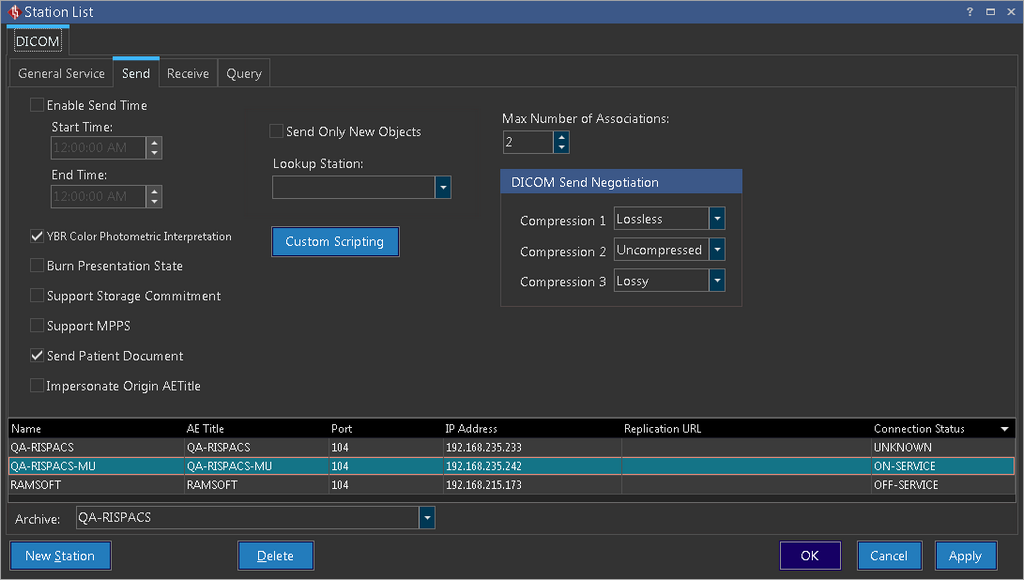
In the Send section of the Station List you will be able to toggle options that a RamSoft station uses to send studies to a remote destination. Any settings you toggle will apply only to the currently highlighted station in the list.
The Enable Send Time option creates a time window during which studies are sent. Any studies queued up for sending outside of the time window, would not go out until the Start Time is reached. This is useful when moving large amounts of data, to a destination such as an archive, during off hours.
YBR Color Photometric Interpretation is a fairly new method for transferring lossless compressed color images. If a device does not support this transfer method, the RamSoft Software would be unable to send a study to that device through this method. By deselecting the box, Lossless color images can be sent to a device using the older RGB Method.
Checking the Burn Presentation State option would modify the original image. This option is meant for sending images to a station that does not support presentation states. Through this option, a person on such a station can view any changes that were applied to the image. It is important to note that the remote station will not be able to see the original image without the modifications made on the RamSoft station.
The Support Storage Commitment option informs the sending station about the receiving status of the studies on the receiving station. The sending station can view the status of Storage Commitment in the Communication Log if support storage commitment was selected in the Send tab.
MPPS is a method that allows stations to receive the most up-to-date status of a study. By selecting Support MPPS, MPPS can be sent to the receiving station when studies are being transferred.
The DICOM Send Negotiation section is used for negotiating transfer syntax. Before any two stations can exchange DICOM data, they have to negotiate the best method for the transfer. This is achieved by each side presenting its possible choices until a match is made. The order with which the RamSoft station will negotiate the transfer is based on this section. Compression 1 will be proposed first. If that is not accepted, Compression 2 and later Compression 3 will be proposed.
The sending station can choose to send only certain objects of the study. When the Send only New Objects checkbox is selected, the sending station will compare the objects in the study being sent to the objects of the same study in the receiving. If there are more objects in the study of the sending station, only those objects will be sent. If there are no new objects being sent, the transmit will not be logged in the Completed section of the Communication log.
The Custom Scripting button is used to modify a DICOM object before it is sent out. When a user clicks on the Custom Scripting button, the Custom Scripting Editor window appears. For more information regarding to Custom Scripting, refer to the Custom Scripting for Advanced Receive Settings
The Archive drop down menu is used to choose which station will the studies be received from when using Open from Server feature.
RELATED TOPICS