ScannerSide Integration
ScannerSide integration provides real-time dose monitoring information into RamSoft PowerServer. ScannerSide integration is enabled through an HL7 engine that is built to receive ORM messages that propagate dosage fields into PowerServer at the database level.
The inbound ORM message is triggered when ScannerSide receives a CT DICOM object with dosage to their software. ScannerSide reads the DICOM object, extracts the dosage information.
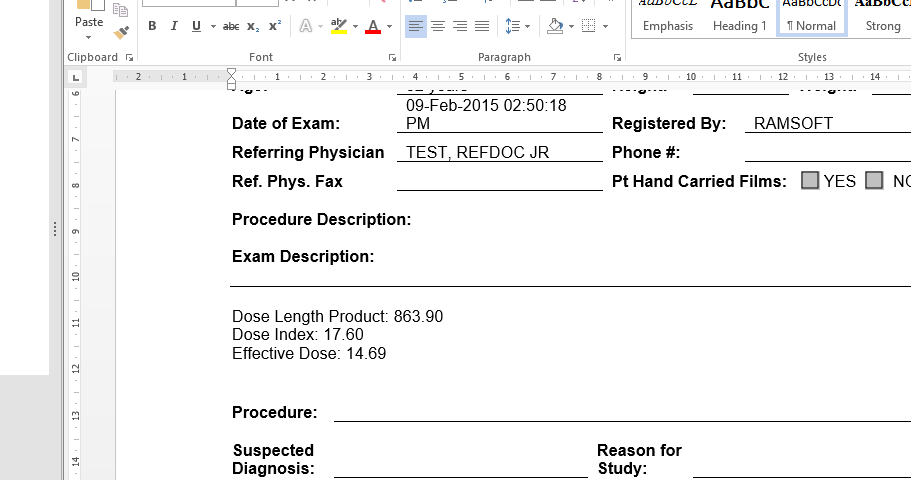
The diagnostic reports in PowerReader can display the dosage information associated with an exam if the following bookmarks are added to the SR template:
- DOSELENGTHPRODUCT
- DOSEINDEX
- EFFECTIVEDOSE
The following screenshot shows how dosage information is rendered in diagnostic reports:
Configuring ScannerSide Integration
PowerReader
-
Login to PowerReader login portal and launch PowerReader.
-
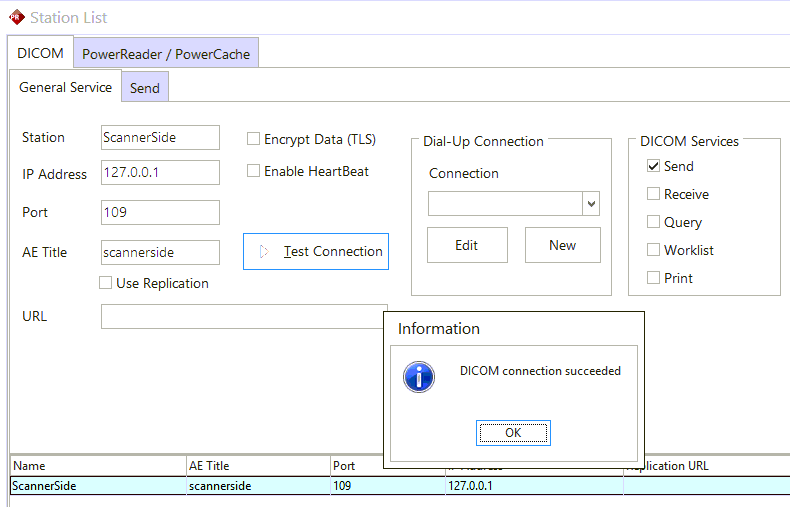
Go to Settings > Server Settings > Station List
-
Click on New Station to create a new station.
-
Enable only Send DICOM service.
-
Enter the address of the local host or enter 127.0.0.1 and specify Port 109 and AE title as "scannerside". Note that AE title is case-sensitive.
-
Click Apply and test the connection. If the configuration is setup correctly, the DICOM connection should be successful.
-
Based on your current Workflow and study status, create a trigger that will route CT studies at COMPLETED status to ScannerSide. Ensure that the dose sheet is sent to ScannerSide after the study has been received via DICOM and before the radiologist signs the report.