Creating Bookmarks
The functionality of Bookmarks is described in detail in the Microsoft Word Documentation. This section simply defines how to use the RamSoft bookmarks.
A bookmark is simply a placeholder. It is inserted in a diagnostic report by clicking Insert > Bookmarks.
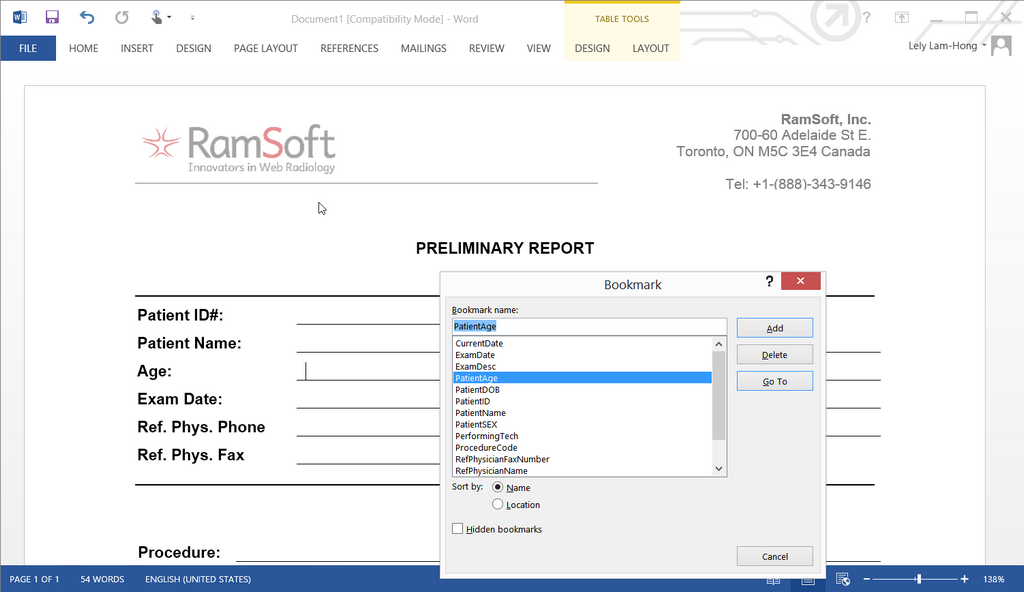
This will open the Bookmark dialog.
If the desired bookmark name appears in the list, highlight it and choose Add. It will be inserted into the current location of the cursor. If it does not appear in the list, it can be typed in and then Added. Even though the bookmark has been added, nothing will be visible in that location. The field will not be populated until the RamSoft software loads the template. It is STRONGLY recommended that bookmarks are placed in table cells similar to the default templates supplied by RamSoft. Failure to do so may lead to bookmark fields not properly updating. Moreover, the table cells should be empty and without any special characters/ brackets.
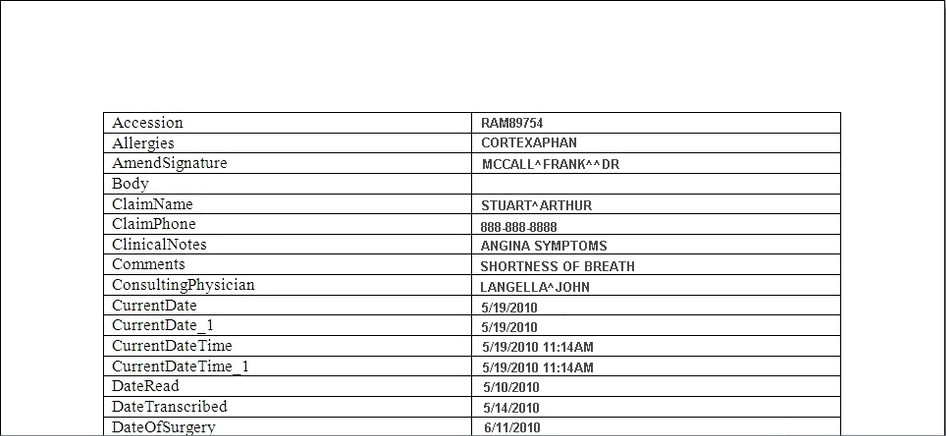
The following is the list of bookmarks supported by RamSoft. Note that bookmarks are case-sensitive.
| Bookmark | Information populated by RamSoft |
|---|---|
| Accession | Accession number of the study (One-time occurrence) |
| AccountNumber | Pulls the account number from patient information (One-time occurrence) |
| Addendum | Inserts the "Addendum Begin" and "Addendum End" tags in the report |
| Allergies | Allergies of the Patient (One-time occurrence) |
| AmendSignature | Keeps a history record of all the users that amended the report. Name of the physician that amended the report; also the time and date the report was amended. Date & time would be: UTC offset time if ReportUseStudyUTCTime config is true, otherwise gives the server time. |
| AmendSignatureImage | The signature of the physician who amended the report. |
| Body | Positions the cursor to this bookmark spot (used if ExamHistory does not exist) |
| ClaimName | Name of the claim adjustor (One-time occurrence) |
| ClaimPhone | Phone number of the claim adjustor (One-time occurrence) |
| ClinicalNotes | Clinical notes for the study (One-time occurrence) |
| Comments | Comments for the study (One-time occurrence) |
| ConsultingPhysician1Name | Name of the First Consulting Physician |
| ConsultingPhysician1NPI | NPI ID number of the First Consulting Physician |
| ConsultingPhysician1FaxNumber | Fax number of the First Consulting Physician |
| ConsultingPhysician1PhoneNumber | Phone number of the First Consulting Physician |
| ConsultingPhysician1Address1 | Street address of the First Consulting Physician |
| ConsultingPhysician1Address2 | City State and Zip code of the first consulting physician |
| ConsultingPhysician1Address3 | Country of the First Consulting Physician |
| ConsultingPhysician2Name | Name of the second consulting physician |
| ConsultingPhysician2NPI | NPI ID number of the second consulting physician |
| ConsultingPhysician2FaxNumber | Fax Number of the Second Consulting Physician |
| ConsultingPhysician2PhoneNumber | Phone Number of the Second Consulting Physician |
| ConsultingPhysician2Address1 | Street address of the Second Consulting Physician |
| ConsultingPhysician2Address2 | City, State and Zip code of the Second Consulting Physician |
| ConsultingPhysician2Address3 | Country of the Second Consulting Physician |
| ConsultingPhysician3Name | Name of the Third Consulting Physician |
| ConsultingPhysician3NPI | NPI ID number of the third consulting physician |
| ConsultingPhysician3FaxNumber | Fax number of the Third Consulting Physician |
| ConsultingPhysician3PhoneNumber | Phone Number of the Third Consulting Physician |
| ConsultingPhysician3Address1 | Street address of the Third Consulting Physician |
| ConsultingPhysician3Address2 | City, State and Zip Code of the Third Consulting Physician |
| ConsultingPhysician3Address3 | Country of the Third Consulting Physician |
| ConsultingPhysician4Name | Name of the Fourth Consulting Physician |
| ConsultingPhysician4NPI | NPI ID number of the fourth consulting physician |
| ConsultingPhysician4FaxNumber | Fax number of the Fourth Consulting Physician |
| ConsultingPhysician4PhoneNumber | Phone Number of the Fourth Consulting Physician |
| ConsultingPhysician4Address1 | Street Address of the Fourth Consulting Physician |
| ConsultingPhysician4Address2 | City, State and Zip code of the Fourth Consulting Physician |
| ConsultingPhysician4Address3 | Country of the Fourth Consulting Physician |
| ConsultingPhysician5Name | Name of the Fifth Consulting Physician |
| ConsultingPhysician5NPI | NPI ID number of the fifth consulting physician |
| ConsultingPhysician5FaxNumber | Fax Number of the Fifth Consulting Physician |
| ConsultingPhysician5PhoneNumber | Phone Number of the Fifth Consulting Physician |
| ConsultingPhysician5Address1 | Street Address of the Fifth Consulting Physician |
| ConsultingPhysician5Address2 | City, State and Zip code of the Fifth Consulting Physician |
| ConsultingPhysician5Address3 | Country of the Fifth Consulting Physician |
| CurrentDate | Displays the current date on the server machine. Format configurable through 'Report Study Date Only Format' configuration entry. Note: This field is not configured by Report Use Study UTC Time but is instead based on the UTCOFFSET field in the PATIENTSTUDY table. It will display the time on the server machine accounting for time zone differences. (Appear up to 2 times within a Report). |
| CurrentDate_1 | Identical to CurrentDate (Appear up to 2 times within a Report). |
| CurrentDateTime | Displays the current date and time on the server machine. Format configurable through 'Report Study Date and Time Format' configuration entry. Note: This field is not configured by Report Use Study UTC Time but is instead based on the UTCOFFSET field in the PATIENTSTUDY table. It will display the time on the server machine accounting for time zone differences. (Appear up to 2 times within a Report). |
| CurrentDateTime_1 | Identical to CurrentDateTime (Appear up to 2 times within a Report). |
| Customfield1 | Displays the value of Custom Field 1: in the 'Other' tab of the 'Study Info Detailed' form. |
| Customfield2 | Displays the value of Custom Field 2: in the 'Other' tab of the 'Study Info Detailed' form. |
| Customfield3 | Displays the value of Custom Field 3: in the 'Other' tab of the 'Study Info Detailed' form. |
| Customfield4 | Displays the value of Custom Field 4: in the 'Other' tab of the 'Study Info Detailed' form. |
| Customfield5 | Displays the value of Custom Field 5: in the 'Other' tab of the 'Study Info Detailed' form. |
| Customfield6 | Displays the value of Custom Field 6: in the 'Other' tab of the 'Study Info Detailed' form. |
| Custommemo | Displays the value of Custom Memo1: field in the 'Other' tab of the 'Study Info Detailed' form. |
| DateRead | Date the study was read |
| DateTranscribed | Date the study was transcribed. Date & time would be: UTC offset time if ReportUseStudyUTCTime config is true, otherwise gives the client time. |
| Department | Department that conducted the study. (One-time occurrence) |
| DiagnosisCodesDescription | Description of the diagnosis code |
| DOSELENGTHPRODUCT | Example: 2037.94 (One-time occurrence) |
| DOSEINDEX | Example: 16.22 (One-time occurrence) |
| EFFECTIVEDOSE | Example: 38.72 (One-time occurrence) |
| EmergencyContactName | Emergency contact name (One-time occurrence) |
| EmergencyContactPhone | Emergency contact phone number (One-time occurrence) |
| EmergencyContactRelationship | Emergency contact relationship to the patient (One-time occurrence) |
| EmploymentStatus | Employment status (One-time occurrence) |
| Employer | Employer's name (Up to 2 times within a Report) |
| Employer_1 | Identical to Employer (Up to 2 times within a Report) |
| EmployerAddress1 | Employer's Address (Up to 2 times within a Report) |
| EmployerAddress1_1 | City, State and zip code of the employer (Up to 2 times within a report) |
| EmployerAddress2 | Identical to EmployerAddress1 |
| EmployerAddress2_1 | Identical to EmployerAddress1_1 |
| EmployerBusinessPhone | Business phone number of the facility (Up to 2 times within a Report) |
| EmployerBusinessPhone_1 | Identical to EmployerBusinessPhone |
| ExamDate | Date of the study (Up to 5 times within a Report). |
| ExamDate_1 | Identical to ExamDate |
| ExamDate_2 | Identical to ExamDate |
| ExamDate_3 | Identical to ExamDate |
| ExamDate_4 | Identical to ExamDate |
| ExamDesc | Study Description |
| ExamDesc_1 | Identical to ExamDesc |
| ExamDesc_2 | Identical to ExamDesc |
| ExamHistory | Positions the cursor to this bookmark spot |
| ExamRoom | The examination room number One-time occurrence |
| Facility | Facility at which study was performed (Can appear up to 11 times within a report) |
| Facility_1 | Identical to Facility |
| Facility_2 | Identical to Facility |
| Facility_3 | Identical to Facility |
| Facility_4 | Identical to Facility |
| Facility_5 | Identical to Facility |
| Facility_6 | Identical to Facility |
| Facility_7 | Identical to Facility |
| Facility_8 | Identical to Facility |
| Facility_9 | Identical to Facility |
| Facility_10 | Identical to Facility |
| FacilityAddress1 | Facility's address (Can appear up to 2 times within a report) |
| FacilityAddress1_1 | Identical to FacilityAddress1 |
| FacilityAddress2 | City, state and zip code of the facility (Can appear up to 2 times within a report) |
| FacilityAddress2_1 | Identical to FacilityAddress2 |
| FacilityFaxNumbers | Facility's fax numbers; will only be displayed if "Fax to Facility" is checked for the specific facility; if more than one, they will be separated by a comma (One-time occurrence) |
| FacilityPhoneNumber | Business phone number of the facility (Can appear up to 2 times within a report) |
| FacilityPhoneNumber_1 | Identical to FacilityPhoneNumber |
| IssuerOfPatientID | Issuer of Patient (One-time occurrence) |
| Image | Populates Images; If you have more than one image, you can name the bookmarks as Image1, Image2 etc. You can have up to 99 Image bookmarks. It is important to ensure that the numbers are consecutive as any bookmarks after a gap in numbering will be ignored. Image bookmarks must be encapsulated in a table for them to appear. For details on inserting an image bookmark, see the section on "Image Bookmarks" in Creating Structured Report Templates in Word. |
| PatientAddress1 | Patient's Address |
| PatientAddress1_1 | Identical to PatientAddress1 |
| PatientAddress1_2 | Identical to PatientAddress1 |
| PatientAddress2 | City, state and zip code of the patient |
| PatientAddress2_1 | Identical to PatientAddress2 |
| PatientAddress2_2 | Identical to PatientAddress2 |
| PatientAge | Patient's age (One-time occurrence) |
| PatientBusinessPhoneNumber | Patient's business phone number (One-time occurrence) |
| PatientCellNumber | Patient's cell phone number (One-time occurrence) |
| PatientDOB | Patients Date of Birth (Can appear up to 5 times within a Report). |
| PatientDOB_1 | Identical to PatientDOB (Can appear up to 5 times within a Report). |
| PatientDOB_2 | Identical to PatientDOB (Can appear up to 5 times within a Report). |
| PatientDOB_3 | Identical to PatientDOB (Can appear up to 5 times within a Report). |
| PatientDOB_4 | Identical to PatientDOB (Can appear up to 5 times within a Report). |
| PatientHomePhoneNumber | Patient's home phone number (One-time occurrence) |
| PatientID | Patient ID (Appear up to 5 times within a Report). |
| PatientID_1 | Identical to PatientID (Appear up to 5 times within a Report). |
| PatientID_2 | Identical to PatientID (Appear up to 5 times within a Report). |
| PatientID_3 | Identical to PatientID (Appear up to 5 times within a Report). |
| PatientID_4 | Identical to PatientID (Appear up to 5 times within a Report). |
| PatientLocation | Location of the patient (One-time occurrence) |
| PatientMaritalStatus | Patient's marital status |
| PatientName | Full Name of Patient (Can appear 4 times within a report). |
| PatientName2 | Identical to the PatientName bookmark. Having two bookmarks allows for the ability to place the patient's name twice in a report. |
| PatientName3 | Identical to PatientName |
| PatientName4 | Identical to PatientName |
| PatientNameType2 | Patient First and Last Name only |
| PatientNameType2_1 | Identical to PatientNameType2 |
| PatientNameType2_2 | Identical to PatientNameType2 |
| PatientSex | Patient's gender (One-time occurrence). |
| PatientSSN | Patient's social security number (One-time occurrence). |
| PerformingPhysician | Name of performing physician assigned to this study (One-time occurrence) |
| PerformingPhysicianNPI | NPI ID number of the first performing physician (One-time occurrence) |
| PerformingTech | Name of performing tech assigned to this study (Up to 3 times within a Report) |
| PerformingTech_1 | Identical to PerformingTech |
| PerformingTech_2 | Identical to PerformingTech |
| PerformingTechNPI | NPI ID number of the performing Technician (One-time occurrence) |
| PrimaryCoverageCoPay | Co-pay amount of the primary coverage. This is the amount the patient pays. |
| PrimaryInsuranceCompany | Primary insurance company's name (One-time occurrence) |
| PrimaryInsuranceGroup | Primary insurance group (One-time occurrence) |
| PrimaryInsurancePolicyHolder | Primary insurance policy holder's name (One-time occurrence) |
| PrimaryInsurancePolicyHolderDOB | Primary insurance policy holder's date of birth (One-time occurrence) |
| PrimaryInsuranceID | Primary insurance's ID |
| ProcedureCode | Procedure code for the study (One-time occurrence) |
| ProcedureCodesDescription | Description of the procedure code |
| ProcedureEducationResourceURL1 | Populates the URL for Procedure Code associated with the Study |
| ProcedureEducationResourceURL2 | Identical to ProcedureEducationResourceURL1 |
| ProcedureEducationResourceURL3 | Identical to ProcedureEducationResourceURL1 |
| ProcedureEducationResourceURL4 | Identical to ProcedureEducationResourceURL1 |
| ReadingFacility | Name of the Reading facility as described in the Study Info-Assigned Personnel tab. (One-time occurrence). |
| ReadPhysicianName | Name of Reading Physician (One-time occurrence). |
| ReadPhysicianNPI | NPI ID number of the reading physician (One-time occurrence) |
| ReceivedDateTime | Displays the time and date when the study was received. Displays UTC offset time if ReportUseStudyUTCTime config is true, otherwise gives the GMT/UTC time. (One-time occurrence) |
| ReferringFacility | Name of the Referring facility as described in the Study Info-Assigned Personnel tab. (One-time occurrence) |
| ReferringFacilityAddress1 | Referring Facility's street address |
| ReferringFacilityAddress2 | Referring Facility's Province/State, ZIP/Postal Code and Country |
| ReferringFacilityAddress1_1 | Referring Facility's street address |
| ReferringFacilityAddress2_1 | Referring Facility's Province/State, ZIP/Postal Code and Country |
| ReferringFacilityPhoneNumber | Referring Facility's Phone number |
| ReferringFacilityPhoneNumber_1 | Identical to ReferringFacilityPhoneNumber |
| ReferringFacilityFaxNumbers | Referring Facility's Fax number (One-time occurrence) |
| RefPhysicianFaxNumber | Referring physician's fax number; will only be displayed if "Fax to Personal Contact" is checked for this specific referrer (One-time occurrence) |
| RefPhysicianAddress1 | Referring physician's street address (Up to 2 times within a Report) |
| RefPhysicianAddress1_1 | Identical to RefPhysicianAddress1 |
| RefPhysicianAddress2 | Referring physician's city and province/state (Up to 2 times within a Report) |
| RefPhysicianAddress2_1 | Identical to RefPhysicianAddress2 |
| RefPhysicianAddress3 | Referring physician's country (Up to 2 times within a Report) |
| RefPhysicianName | Name of Referring Physician (Up to 4 times within a report) |
| RefPhysicianName_1 | Identical to RefPhysicianName |
| RefPhysicianName_2 | Identical to RefPhysicianName |
| RefPhysicianName_3 | Identical to RefPhysicianName |
| RefPhysicianNPI | NPI ID number of the referring physician (One-time occurrence) |
| RefPhysicianPhoneNumber | Referring physician's business phone number (One-time occurrence) |
| ReportStatus | Status of the report (Preliminary, Final, etc) (One-time occurrence) |
| RequestedProcedureID | Displays the procedure ID of the requested study (One-time occurrence) |
| Room | Room location of where the study was performed in. (One-Time occurrence) |
| SchedLaterality | Laterality of body part that the study was performed on (One-time occurrence) |
| ScheduledBodyPart | Body Part selected in the the Study Info Form. (One-time occurrence) |
| ScheduledModality | Scheduled Modality (One-time occurrence) |
| SecondaryInsuranceCompany | Secondary insurance company name (One-time occurrence) |
| SecondaryInsurancePolicyHolder | Secondary insurance policy holder's name (One-time occurrence) |
| SecondaryInsurancePolicyHolderDOB | Secondary insurance policy holder's date of birth (One-time occurrence) |
| SecondaryInsuranceID | Secondary insurance ID (One-time occurrence) |
| SecondaryInsuranceGroup | Secondary insurance group (One-time occurrence) |
| SecondaryCoverageCoPay | Co-Pay amount of the Secondary Coverage (One-time occurrence) |
| Signature | Name of the physician that signed the report; also the time and date the report was signed. Date & time would be: UTC offset time if ReportUseStudyUTCTime config is true, otherwise gives the server time. |
| SignatureImage | The signature of the physician that signed the report |
| StudyID | Displays the Study ID (One-time occurrence) |
| StudyURL | Displays the URL for the link that displays the Study in a Read Only Format web page (One-time occurrence) |
| Symptoms | The symptoms that the patient has experienced (One-time occurrence) |
| SuspectedDiagnosis | Populates information on any suspected diagnosis (One-time occurrence) |
| TranscriptionFacility | Name of the Transcription facility as described in the Study Info-Assigned Personnel tab. (One-time occurrence) |
| Transcriptionist | Name of transcriptionist assigned to this study (One-time occurrence) |
| TranscriptionistNPI | NPI ID number of the Transcriptionist (One-time occurrence) |
| TranscriptionistInitials | Initials of the Transcriptionist's name (One-time occurrence) |
| TertiaryInsuranceCompany | Name of the tertiary insurance company (One-time occurrence) |
| TertiaryInsurancePolicyHolder | Name of policy holder for the tertiary insurance (One-time occurrence) |
| TertiaryInsurancePolicyHolderDOB | Date of birth of the tertiary insurance policy holder. (One-time occurrence) |
| TertiaryInsuranceID | ID for the tertiary insurance (One-time occurrence) |
| TertiaryInsuranceGroup | Group number of the tertiary insurance (One-time occurrence) |
| TertiaryCoverageCoPay | Co-Pay amount for the tertiary insurance policy (One-time occurrence) |
| UserFullName | User's full name (One-time occurrence) |
| UserName | username (One-time occurrence) |
| UserNotes1 | Radiologist's user notes |
The above mentioned bookmarks are filled in using DICOM information. Bookmarks can only have a single instance in a document. For additional instances of the same bookmark variable in a document, a suffix in the form of '_1' or '_2', etc, is added to the end of the variable.
DICOM SR reports are rendered using a Word template dynamically. Bookmarks such as UserFullName or CurrentDateTime that are dynamic should not be used in the default or Facility level Word templates. Instead, you can use the ReadPhysicianName and DateRead bookmarks.