Storing and Retrieving Studies with Google DICOM Web Integration
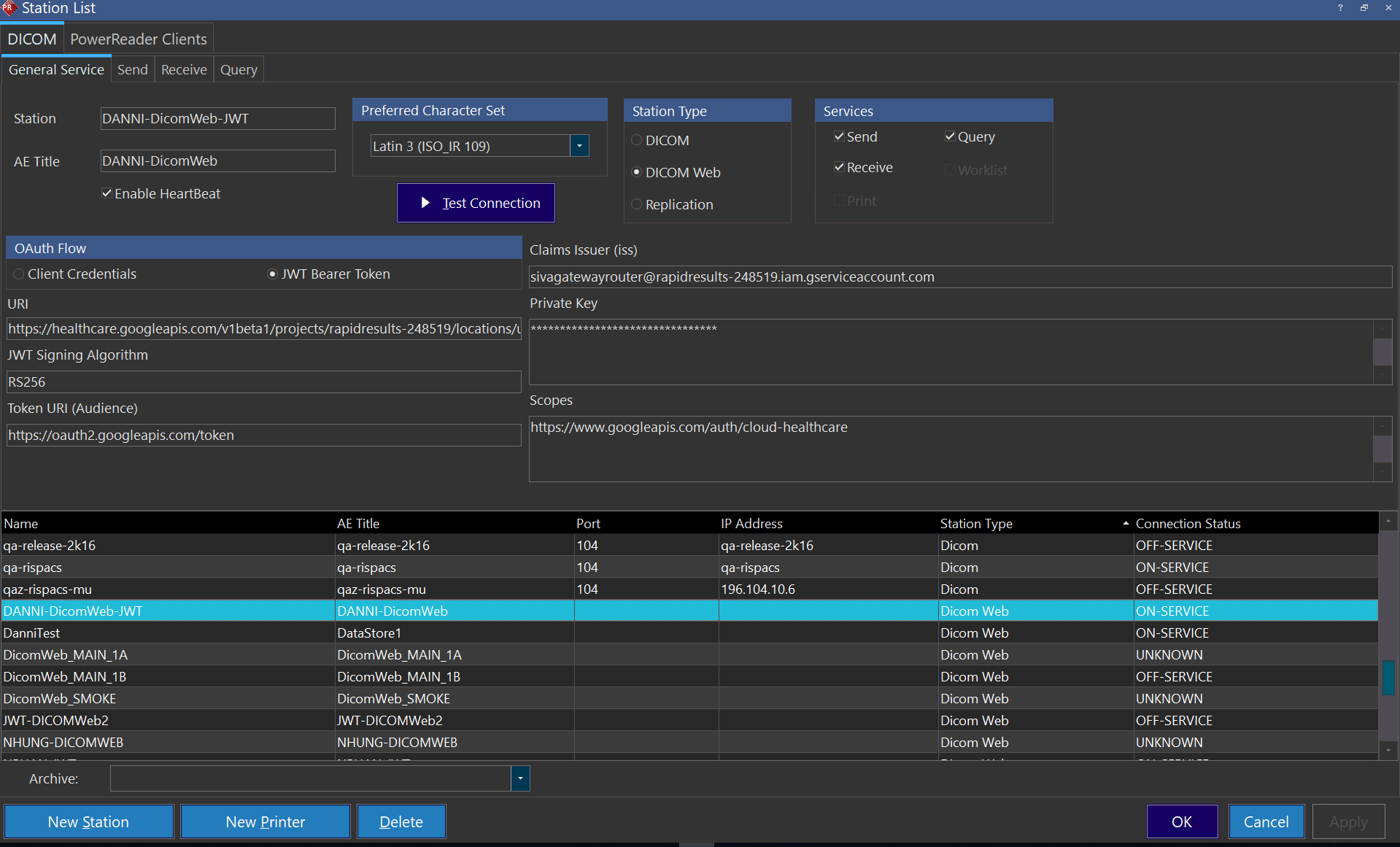
Similar to the integration with the conventional DICOM Station, the users are able to configure a Station List in PowerReader to connect to a Google DICOM Store (https://cloud.google.com/healthcare/docs/concepts/dicom). Once the configuration is completed, the below actions can be performed between PowerServer and Google DICOM Store:
- Send / Send New Objects
- Find Studies (Remote Studies Search)
- Request Studies (Retrieving the remote studies)
- Echo (Test Connection)
- Heartbeat
The Modality Performed Procedure Step Service (MPPS) is also supported. Refer to the Service Manual or contact RamSoft Technical Support team for assistance with the configuration of the Google DICOM Web integration.
To add a DICOM web station follow these steps:
- Select DICOM Web from Station Type options.
- Under OAuth Flow select JWT Bearer Token (used for Google Dicom Store).
- You need to enter the following information:
- URI
- JWT Signing Algorithm
- Token URI (Audience)
- Claims Issuer (iss)
- Private Key
- Scopes
- You can test the connection by clicking on "Test Connection"
- Click apply to save your changes.