Advanced User Administration
System administrators have two unique user control options that are only accessible through the User List. Right clicking any user in the User List will open the following menu.
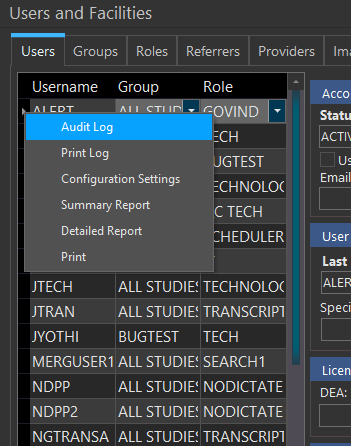
The Audit Log option allows previewing or printing of the audit log for the currently selected user, further information on this is available in How Do I View a User level Audit Log?
The Print Log option allows previewing or printing of the print log i.e. what items this user has printed for the currently selected user. Further information on this is available in How Do I View a Users' Print Log?
The Configuration Settings option in the menu opens up the User Configuration table. This table stores a variety of information about the user. This information can be edited. Please view the Service Manual to understand what each item controls.
The Summary Report option generates an excel report with basic information about the users. This report can also be saved for further reference.
The Detailed Report option generates an excel report with detailed information about the users. This report can be saved for further reference as well.
The Print option generates a Print Preview of a detailed report containing the information about the users with an option to print.