Status Determination After DICOM Receive
It is possible that existing study could receive images from other DICOM station through DICOM push or replication. It happens when Radiologist asks for the additional images or existing images to be modified for accurate study interpretation.
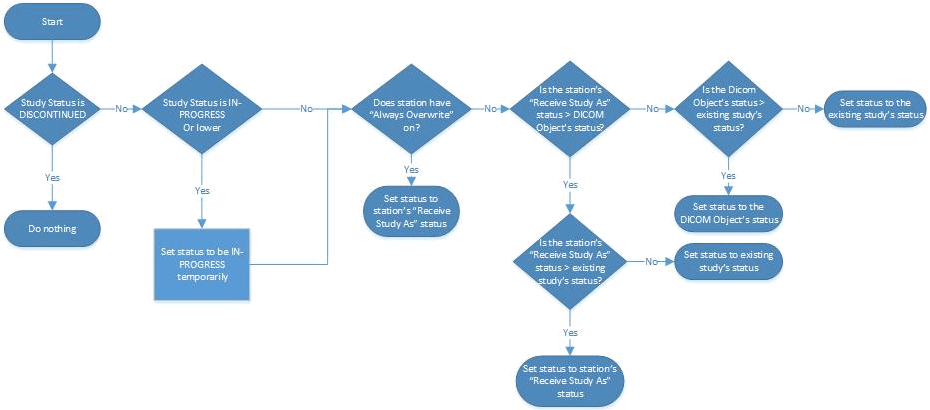
Once the DICOM objects are received in existing study, the STATUS of the study is determined by following system logic.
-
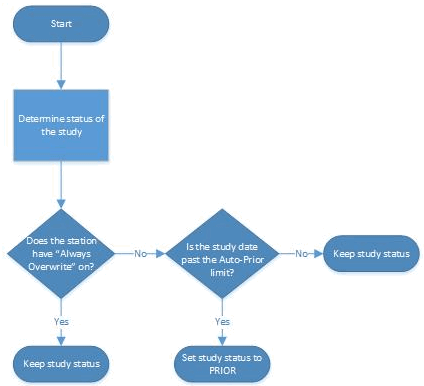
If 'Receive Status' on station list is blank then received objects STATUS is applied if it is a valid status and a greater status than the current study status. Auto prior rule is applied, that means if study date/time is older than 30 days, the study status is set to PRIOR. If no objects are saved (older/invalid) from the newly received objects, then study status is not updated.
-
If 'Receive Status' is set, then this status is set as study STATUS if it is greater than current study status and at least one object is successfully stored. Auto prior rule is applied, that means if study date/time is older than 30 days, the study status is set to PRIOR.
-
If 'Receive Status' is set and 'Always Overwrite Status' option is enabled, then this status is applied if at least one object is received. In this case Auto Prior does not apply even if the study date/time is older than 30 days.
Receive Status - Determining the study status
Receive Status with Auto-Prior logic