Finding Studies on Remote Machines
The Remote Studies feature can be used to locate a study that doesn't currently available on your machine.
The Remote Studies tab could be accessed from the PowerWorklist. Click Advanced > Remote Studies tab.
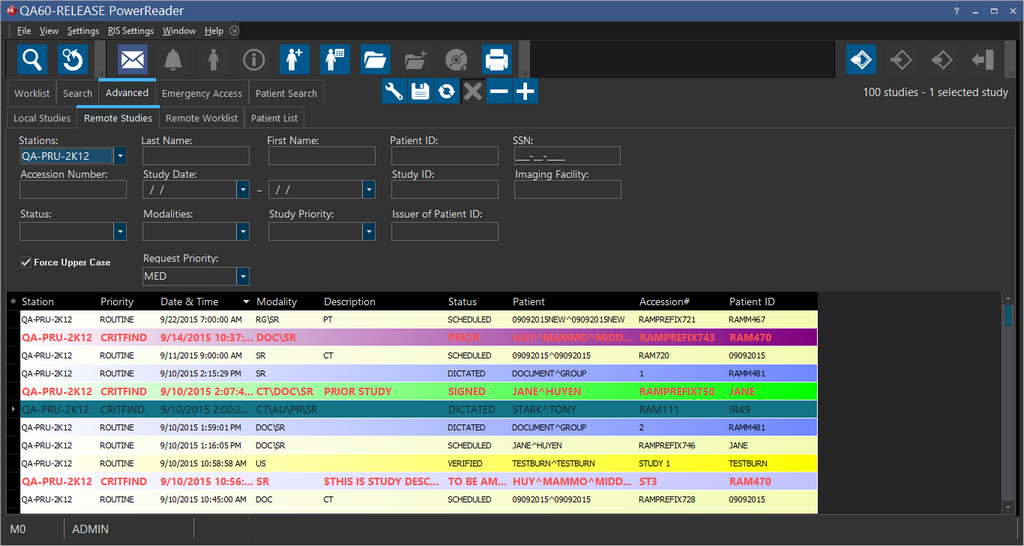
To search a specific station, choose a device from the Stations dropdown menu. Type any other criteria that will help narrow down the search and press the Search button. The results returned will be a listing of studies from the remote machines.
Note: All search text fields are case sensitive.
Pressing the Request button pulls the study and places it into the database. Pressing the Open button pulls the case and launches the Study Desktop. If multiple studies are being pulled, the Requesting Priority field can be used to determine which study to arrive first. For example, if a study is requested with Low priority and there are already ten requested studies in the queue, the new request will be placed at the end and will not be attempted until all the other studies arrive. If a study is requested with HIGH priority, study is requested before the first ten requests are finished.