Image Series
Images are linked to form a series. Two series can be linked together, so that images in both series will scroll together when scrolling on one series (See: Linking Images Across Series). Desired series can be fused together, and viewed on top of each other to locate altered metabolic activities at the exact anatomical position (See: Fusing Series).
How a Series is Split:
By default the series of a study is split if the images in the series have different values for the following DICOM tags:
| Values | DICOM tags |
|---|---|
| (0020, 0052) | FrameOfReferenceUID |
| (0054, 0220) | View Code Sequence |
| (0054, 0222) | View Modifier Code Sequence |
| (0008, 2218) | Anatomic Region Sequence |
| (0008, 2228) | Primary Anatomic Structure Sequence |
| (0018, 0086) | Echo number |
| (0008, 2220) | Anatomic Region Modifier Sequence |
| (0008, 2230) | Primary Anatomic Structure Modifier Sequence |
Based on the viewing protocol layout setup, the images are displayed in a Stack mode.
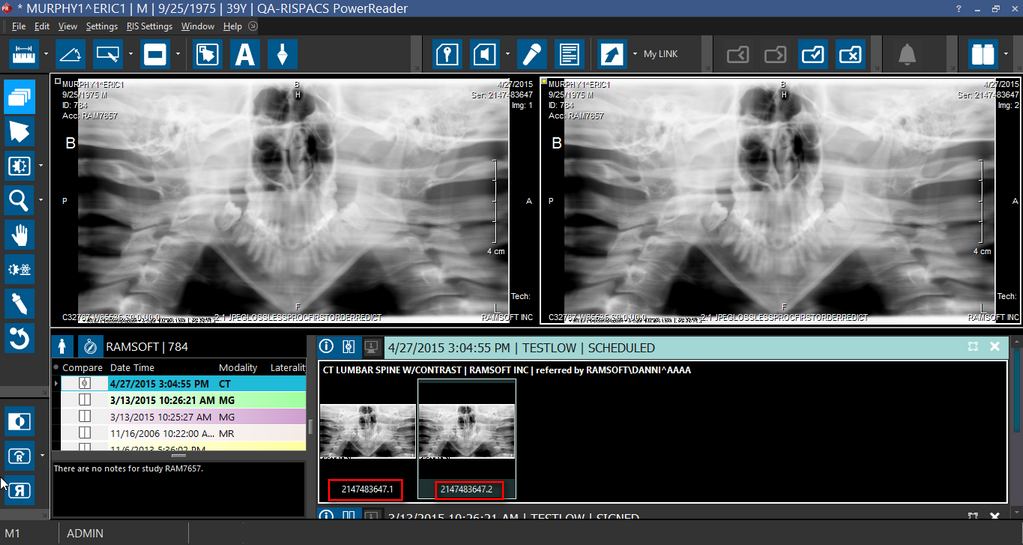
The pseudo-series would have the images whose DICOM tag values are different and the series frameset can be identified in the Patient Explorer by thumbnail series representing the pseudo-series.
For example, if you have a thumbnail series # 8 with 6 images out of which 3 images have different DICOM tag values, you can see that the thumbnails series having images with the same DICOM tag value is displayed as 8.1 and a pseudo-thumbnails series is created and displayed as 8.2 where 8 is the Series number and .1 and .2 are the frameset numbers.
Multi-Phase Framesets
Multi-phase framesets are created when an image series is split due to a significant jump in the slice location between the current slice and the previous slice. This include the case where an axial series is split based on a change of angle. Any cross-sectional modality can contain multi-phase framesets.
For multi-phase framesets such as CT with arterial and delayed phases, each phase is separated into own Frameset. The viewing protocols are linked so they scroll together. Scrolling through one Viewport displays the arterial phase and the other Viewport displays the delayed phase. Both scroll together.
Enhanced DICOM Images
Enhanced DICOM Images are used by newer modalities and do not obey the aforementioned splitting rules. These include Enhanced MR, Enhanced CT, Enhanced XA/XRF, Enhanced PET, 3D X-ray and Enhanced US. The enhanced images are coded into stacks by modality, and each series can be displayed as a number of stacks. There can be multiple frames in a single object. Each selection of frames constitute a:
- Volume in Space
- Temporal Sequence
- Contrast Administration Phase, or
- Physiological Parameter, e.g. Diffusion B Value
If the splitting behavior for Enhanced DICOM Images is not desired, modalities can be configured to use the older DICOM SOP classes. Users will need to consult with their modality vendor for configuration options.