PowerCache Deployment & Distribution
The loading of images is the most costly part of a PACS system in terms of CPU usage, disk I/O, network bandwidth and time. The RamSoft software addresses this problem by installing a local image cache with each PowerReader workstation, allowing a recently opened image on a workstation to be stored locally for faster retrieval. These locally stored images are fully encrypted and cannot be read outside of the PowerReader program. With the help of this mechanism, entire studies can be sent to the local cache of a PowerReader. The local cache allows these studies to be retrieved much faster, while lowering the load on the PowerServer and the network.
The PowerCache serves a similar purpose to the local cache described above but it is not associated with a single PowerReader workstation. Instead, it resides on a dedicated machine (server / workstation) and is shared by multiple PowerReaders. This is of particular value to facilities which have multiple sites situated on one physical location.
A Local Cache can be licensed to be a PowerCache.
The following terms are closely associated with Cache Distribution:
-
Local Cache: A RamSoft image cache that runs on a PowerReader workstation. It is dedicated to that specific instance of PowerReader.
-
PowerCache: A RamSoft image cache which runs on a dedicated server.It is shared between multiple PowerReaders, generally located at the same site.
-
Primary Site: The facility where the PowerServer is hosted. PowerReader workstations at this site will connect to the PowerServer via the LAN.
-
Remote Site: A part of a facility situated at a different physical location than the PowerServer. PowerReader workstations at a Remote Site connect to the PowerServer via a WAN or the Internet.
-
Image Source: A server that launches the software interface used to retrieve image data. Image Sources include the PowerServer and Caches.
-
Image Sink: The software interface launched by the Image Source. Image Sinks include the PowerReader and Caches.
-
Connection Path: A specification of how a group of PowerReaders, their Local Caches and PowerCaches can connect with their Image Sources.
The following diagram and the sample Workflow below it, describe the flow of image data through a system deployed with caching distributed between Local Caches, a PowerServer and two PowerCaches.
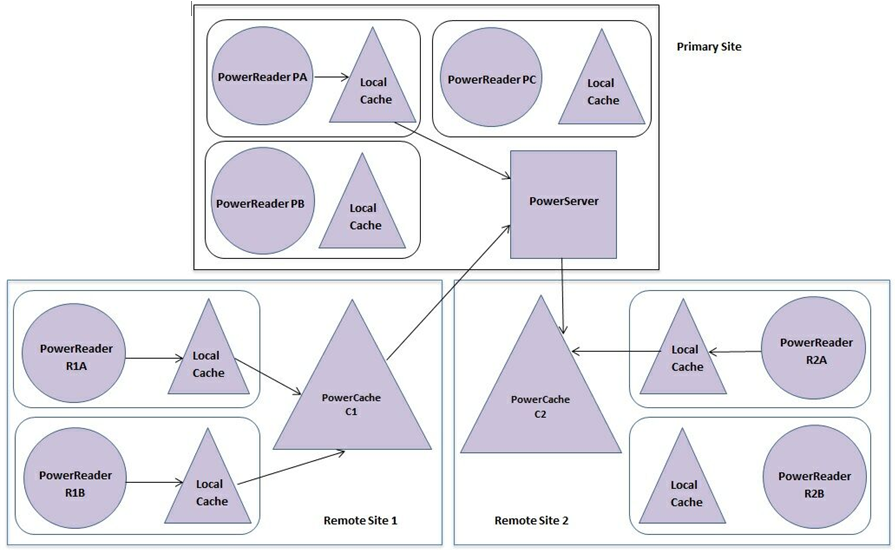
Figure 1 Cache Distribution Data Flow
The above diagram describes the following scenario:
- PowerReader PA at the primary site requests Study 1 from its Local Cache. The Local Cache retrieves it from the PowerServer.
- PowerReader R1A at remote site 1 requests Study 2 from its Local Cache. The Local Cache retrieves it from PowerCache C1, which in turn retrieves it from the PowerServer at the primary site. PowerCache C1 saves a copy of the study 2 as well.
- PowerReader R1B at remote site 1 also requests Study 2 from its Local Cache. The Local Cache is provided the study 2 data already stored at PowerCache C1. PowerCache C1 avoids the extra step of retrieving study 2 from PowerServer at the primary site.
- A routing rule is triggered on the PowerServer which DICOM Pushes Study 3 to PowerCache C2 at remote site 2. When R2A at remote site 2 requests Study 3 from its Local Cache, the Local Cache retrieves study 3 from PowerCache C2. Since PowerCache C2 already holds the data for Study 3, it readily provides this data while avoiding the extra step of retrieving study 3 from the PowerServer.
A Connection Path specifies details of the Image Source used for both general classes of Image Sinks (such as all PowerReaders or all Local Caches), as well as specific installed instances (such as the PowerCache C1 above).
There is a "DEFAULT" Connection Path which allows every PowerReader to connect with a Local Cache and all Local Caches to connect with the PowerServer. This Connection Path is predefined and cannot be edited or deleted. When a specific Connection Path cannot be found, or if none is specified, this "DEFAULT" Connection Path is used. In the example above, all workstations at the Primary Site are configured to use the "DEFAULT" Connection Path.
For Remote Site 1, another Connection Path is defined which directs all PowerReaders to connect with their Local Caches; all Local Caches to connect with PowerCache C1 (via TCP) and PowerCache C1 to connect with the PowerServer. Although a Connection Path can be named anything, it is recommended that Connection Paths should be named after the actual physical site. In the above example, it is named "Remote Site 1".
Similarly; for Remote Site 2, another Connection Path is defined which directs all PowerReaders to connect with their Local Caches, all Local Caches to connect with PowerCache C2 (via TCP) and PowerCache C2 to connect with the PowerServer. In this case example it is named "Remote Site 2".
On startup, each Image Sink queries the PowerServer and finds out the Image Sources it can connect with. The result is a list of Image Sources, with the preferred Image Source followed by other alternative Image Sources. The last item in the list is always a pointer to the PowerServer itself. In the case of the "DEFAULT" Connection Path, this list may contain only one item. In the event of a failure by PowerCache C1 (e.g. a hardware failure or power outage), the Power Readers at Remote Site 1 will continue to connect with their Local Caches, but those Local Caches will detect the failure of C1 and re-connect directly with the PowerServer. When PowerCache C1 comes back online, the Local Caches at Remote Site 1 will detect this change and reconnect with C1 as their Image Source.
Note: A PowerCache can be taken offline for hardware or software maintenance and then put back online without performing any reconfiguration of the Connection Paths