Centrally Managing PowerReader Clients
An IT user can view all of the PowerReader clients that have been successfully installed and have registered with the server, by launching the Station List. This is performed by clicking Settings > Server Settings > Station List > PowerReader/PowerCache tab.
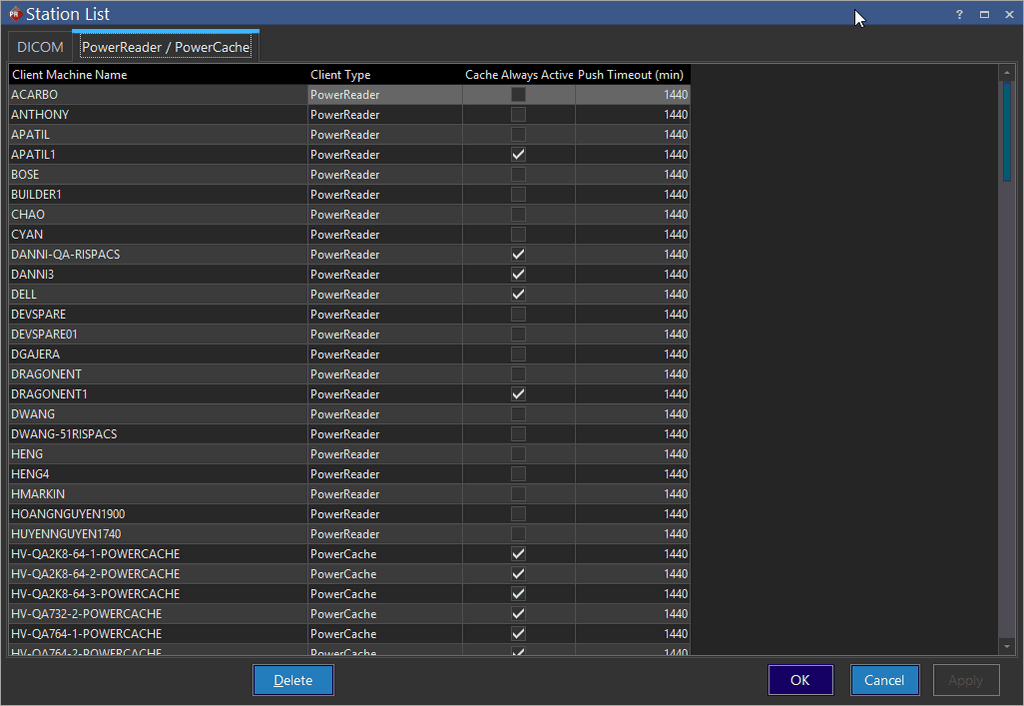
This list contains all of the clients that the server believes are currently active. If a PowerReader client is uninstalled, it needs to be removed from this list. If a client computer has been taken offline, or will no longer be accessing the server, it can be manually removed from this list. To do so, highlight the desired client and click the Delete button.
There are four columns in this list. The first column is the Client Machine Name column which is the name of the client. The Client Type specifies if it is a PowerReader or a PowerCache client. The Cache Always Active checkbox when checked will allow the cache to be turned on even when PowerReader is closed. The Push Time is the number of hours after which the cache will be cleared after PowerReader is closed.