Receiving Messages for Non-Members
Non-Members are notified to download the QliqCONNECT application by an E-mail or Mobile Number (text message), depending on which one is available for the recipient. If both E-mail and Phone numbers are available, the installation messages are sent only to the E-mail address. Two initial messages are sent to the non-member.
The first message informs the user to activate the QliqSOFT account and contain links to install the qliqCONNECT application.
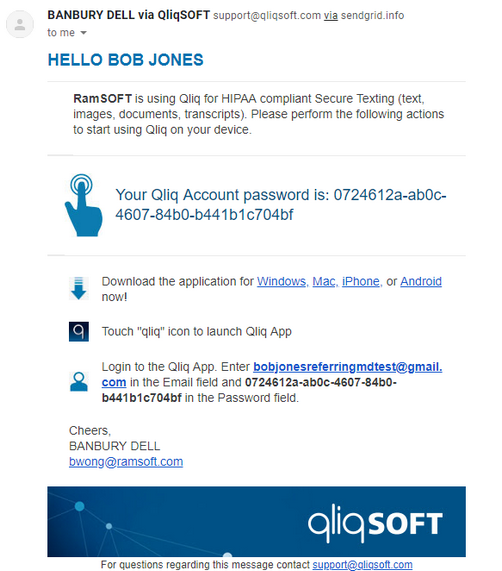
The second message contains the contents of the actual message as a secure message link. The recipient can view and reply to the message by accessing the URL provided. Note that this URL expires after a couple days.

The following is an example of the message body when the Secure Text Message link is opened:
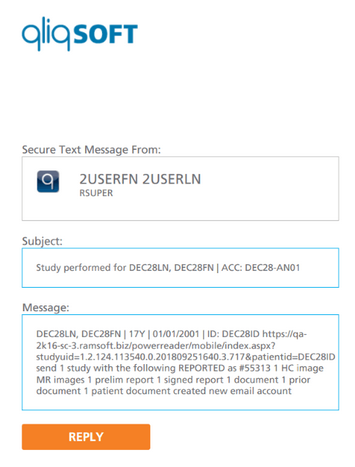
Within the sample message above is a RapidResults link to the study the message is regarding. The link displays the study with only images and the latest signed report. Deprecated reports, patient/study documents, and comparison studies are not visible.
If the invite message to download the app needs to be resent, an Administrator must resend it on the QliqSOFT Dashboard.
qliqCONNECT sample messages
Download, install and launch the qliqCONNECT application to view received messages. An example of a message in the qliqCONNECT application sent by a QliqSOFT Member is displayed below:
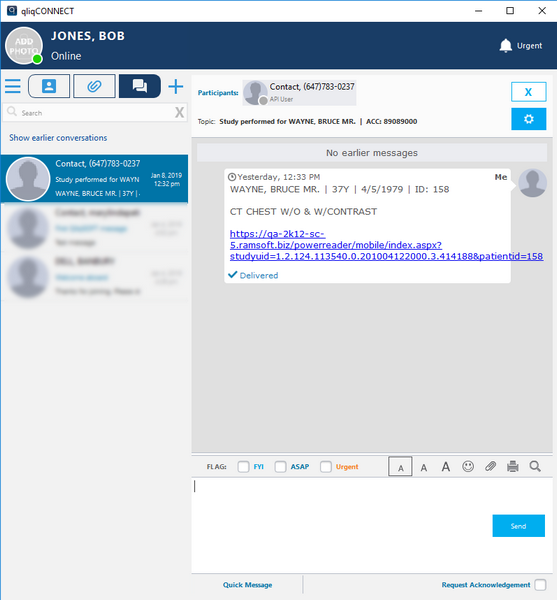
The user can reply to the thread directly in the qliqCONNECT application (desktop or mobile). Users are expected to use qliqCONNECT for further messaging after the initial message has been started in the conversation.