Working With Levels
Annotation levels are used to display different details of annotations. For example, when images are viewed in a hanging protocol that displays many framesets, the size of each individual frame can be small; displaying all the annotations on the image could result in the entire image being clobbered with annotation text. In such scenario, the current annotation level is hidden and the next annotation level, usually with simpler and fewer annotation text, is displayed.
Adding a Level:
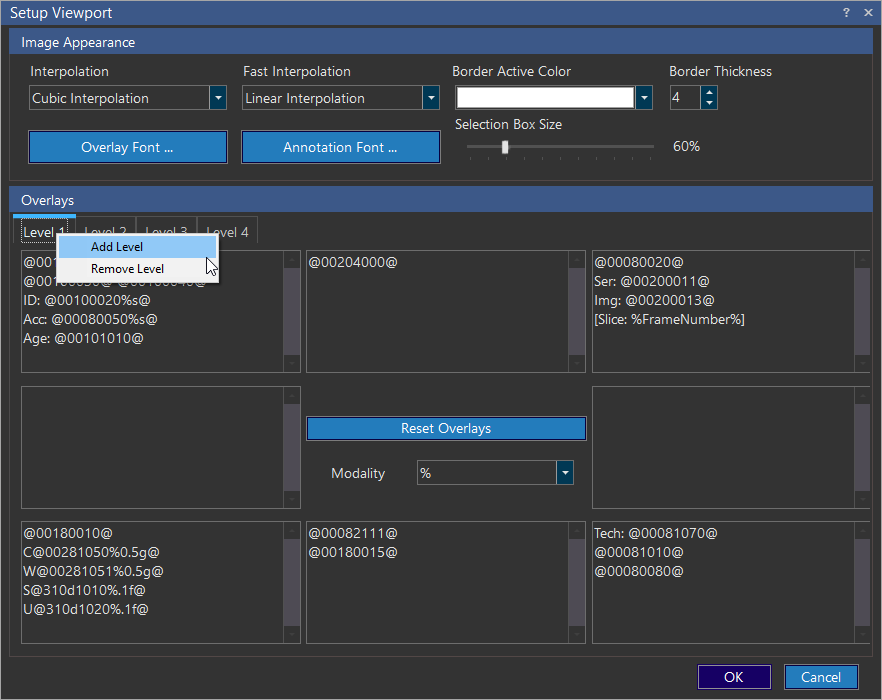
To add an annotation level, right click one of the level tabs in the Overlays section and choose Add Level. The new level will inherit annotations from the lowest existing level. So if the annotation definition for the current modality contains four levels, the newly created Level 5 will inherit its annotation information from Level 4.
The maximum number of annotation levels that you can add is 5.
The System Configuration Entry "Annotation Levels Sensitivity Display Factor" governs the maximum percentage of the image that can be covered by overlay annotations. The default is 50%. If the annotation covers more than the percentage configured, the current annotation level is hidden and the next annotation level is displayed. Similarly, if there are collisions (overlap) between annotation text, the next annotation level is displayed.
Removing a Level:
To remove an annotation level, right click one of the level tabs in the Overlays section and choose Remove Level. The selected level will be permanently deleted from the list.