How do I review a study's amendment history?
The system keeps a record of all the amendment request for any study. To access this history follow these steps:
-
From document viewer of the study that you want to review click on "amendment history" icon on the toolbar:

-
Amendment history screen will be displayed. This screen will list all the amendment requests:
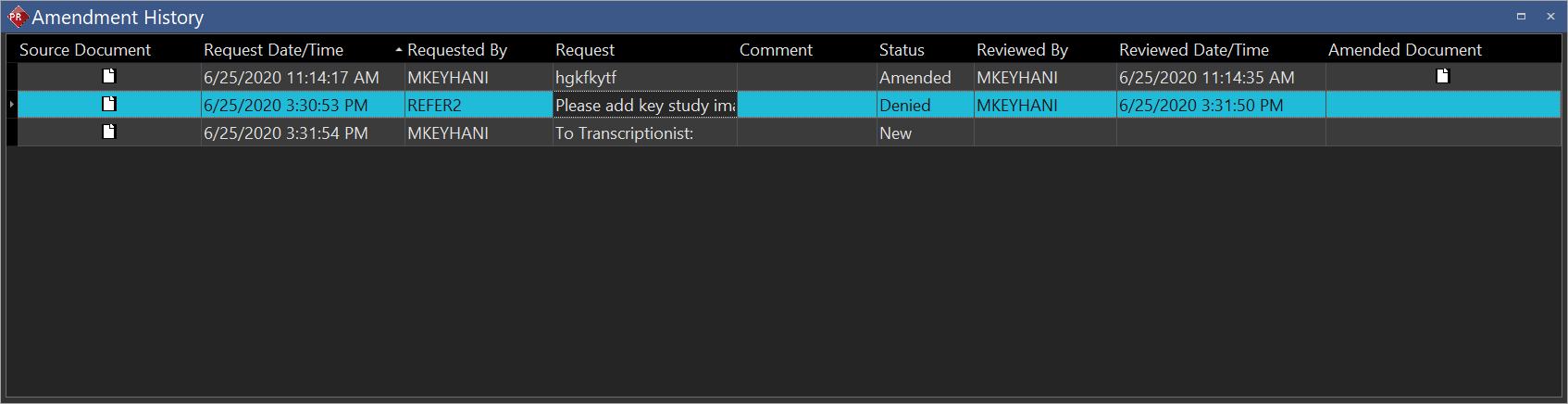
For a detailed description of each field in the Amendment history screen look at the following table:
| FIELD | DESCRIPTION |
|---|---|
| Source Document | Clicking on the icon will open the source document for the amendment request in the document viewer |
| Request Date/Time | The Date/Time that amendment request was made. |
| Requested By | The specific user who requested the amendment. |
| Request | The reason that an amendment was requested. (Note: from PRU10 it is possible to expand this field by clicking on it) |
| Comment | Comments about the amendment that was requested. (Note: from PRU10 it is possible to expand this field by clicking on it) |
| Status | Current status of the amendment. |
| Reviewed By | The specific user who reviewed the request. |
| Reviewed Date/Time | The Date/Time that amendment was reviewed. |
| Amended Document | Clicking on the icon will open the amended document in the document viewer |