What is the Replication Service and How Do I Use It?
The Replication Service is used to send image data directly to the PowerCache. Multi-site Facilities face several challenges since the transfer of data over the internet or WAN is considerably slower than over the LAN. If the PowerServer is located at a remote site, the Workflow will slow down as the exchange of data will be done over the internet. Without the Replication Service, the Gateway or Gateway Router send images to the PowerCache through the PowerServer which is located on another site. Once all the data images have been retrieved by the PowerServer, they are then sent to the PowerCache. The Replication service is aimed at solving issues of modalities at remote sites by enabling them to exchange data with their local PowerCache rather than using the PowerServer.
Useful Hint: Replication Service is the method of choice for file transfer if the PowerServer is located at a remote site. If the PowerServer and the Gateway or Gateway Router are located on the same site, DICOM Transfer should be opted for.
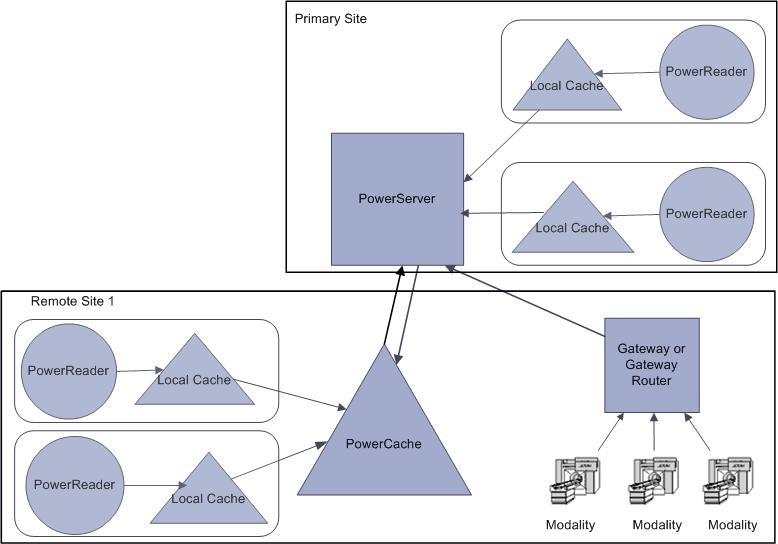
Unlike the PowerCache, Gateway and Gateway Router which are located within the LAN, the PowerServer is usually located on another site. This can sometimes force the PowerServer to transmit or retrieve the image data from the LAN at a lower bandwidth. The Replication Service was created to overcome this geographical barrier. The Replication Service is located in the LAN with the Gateway and Gateway Router. After images are received from Modality machines by the Gateway or Gateway Router, the Replication Service transfers the images to the PowerCache with higher bandwidth over the LAN. As a result, the data saved by the modalities to the PowerCache becomes immediately available to clients of the local site without having to make a round trip to the PowerServer and back, saving both time and Bandwidth usage.
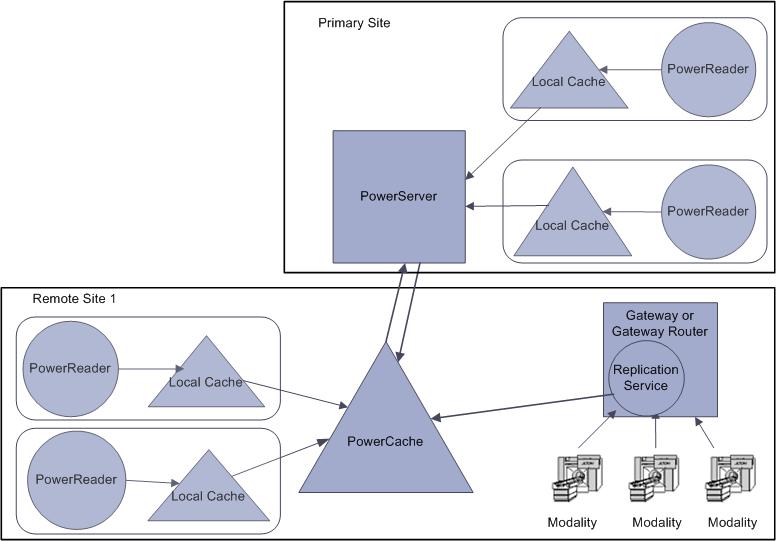
The replication service further adds to these advantages by enabling modalities at remote sites help save data directly to the PowerCache. This reduces the performance bottlenecks of the DICOM protocol and also reduces bandwidth usage. To configure the replication services, please refer to the section How Do I Configure Replication Services Settings and on instructions on using replication, please refer to the section How Do I Use the Replication Service
Note: RamSoft Gateways do not have a URL and hence images cannot be send to them via replication. However, it is possible to send images via replication from a Gateway to a station with a URL (e.g. a PowerServer)