Importing DICOM CDs or Folders
DICOM information is extracted from the imported files; new patients and studies are created accordingly.
- Click File > Import > Import DICOM CD/Folder.

- Select the desired DICOM folder and click OK. Upon click, the selected file will be displayed in DICOM Import screen of the application.
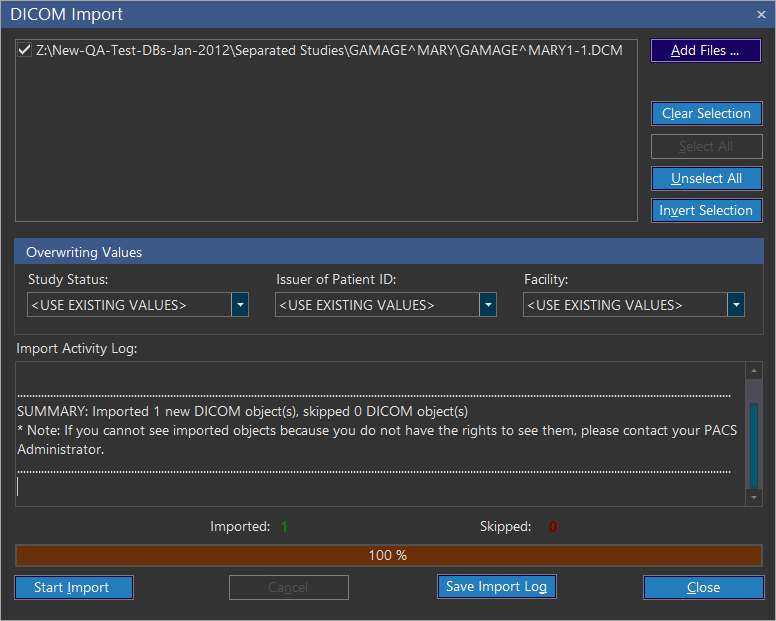
| FIELD | DESCRIPTION |
|---|---|
| Add Folders | Add Folders allows you to add folders/directories. |
| Clear Selection | Clear Selection will remove the selected folder from the list. |
| Select All | Select All allows you to select all files available in the list. |
| Unselect All | Unselect All allows you to unselect the selected folders. |
| Invert Selection | Invert Selection allows you to invert your choices, i.e. Select the unselected folders and unselect the selected folders. |
Overwriting DICOM tags
It is possible to overwrite values in an imported DICOM folder. This feature is useful when the user importing the folder is a member of a group which does not have privileges to see the DICOM files. The following three values can be changed.
| FIELD | DESCRIPTION |
|---|---|
| Study Status | Study Status overwrites the existing study status of the DICOM folder. Select a different value if you are being prevented from viewing studies of a certain status. |
| Issuer of Patient ID | Issuer of Patient ID overwrites the existing Issuer of Patient ID of the DICOM folder. Select a different value if you are being prevented from viewing studies from a certain issuer. |
| Facility | Facility overwrites the existing facility of the DICOM folder. Select a different imaging facility if you are being prevented from viewing studies of a specific imaging facility. |
Overwrite the values in Study Status, Issuer of Patient ID, and Facility fields if required.
Click Start Import. The application starts importing the selected DICOM folders and on completion it displays summary in the bottom of the screen. The summary is classified based on the completion as "Imported" & "Skipped".
Imported: Displays the total count of files been successfully imported.
Skipped: Denotes that if any of the DICOM files were been already imported in the database or not a valid DICOM file.