Meta-Searching
Meta-searching enables a user to search for specific values on a per letter basis. This functionality is useful for users who may not remember the full name or code, but can identify some subset of the term they are looking for. This enhancement has been incorporated into the following forms:
- Insurance Coverage
- Procedure Codes
- Diagnosis Codes
- Assigned Personnel (Study Info)
- Personnel (Reading Physicians, Performing, Technologists, Transcriptionists, Consulting Physicians)
- Facilities
- RapidResults
How to Meta-Search
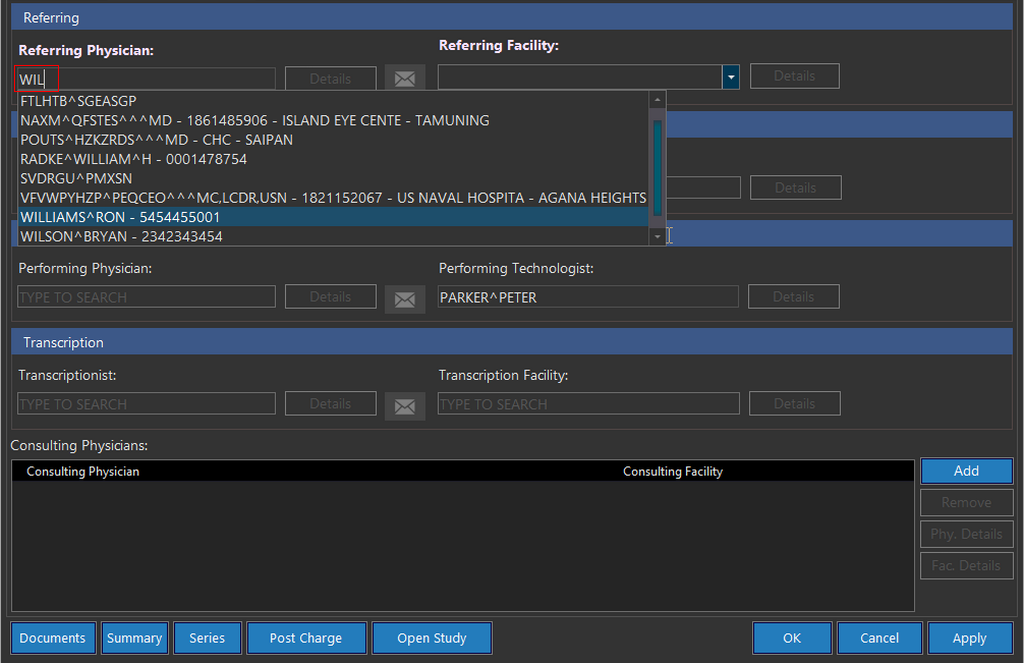
To meta-search, start by typing the starting letter or the first few letters of the First Name or Last Name. The screenshot below depicts a meta-search with the available values matching the values entered into the field so far. The values entered will return results that match any part of the name. For example, if searching a user whose last name is not known, the meta search result displays all potential usernames that matches the entered First Name in the search field.
Assigned Personnel Rules
The assignment of personnel is governed by the following rules:
-
If selecting a physician, the facility associated is automatically filled in the Facility field.
-
If selecting a particular facility, the physician associated is automatically filled in the Physician field.
noteIf the facility selected is associated with more than one physician, the Physician field will remain blank; however, the meta-search will include physicians belonging to the associated facility only.
-
If a physician/technologist/transcriptionist is not affiliated with any facility, their name will be included in the meta-search when the facility field is empty or if the facility is not registered in the system.
-
If a physician/technologist/transcriptionist is being searched in the meta search, the list of names includes only users who belong to the same Issuer of Patient ID as the patient.
-
The Performing Technologist names are filtered according to the Imaging Facility name selected in the Clinical tab.
-
The Performing Physician names are not filtered according to facility name in the meta-search.
Available Fields in the Patient Registration Form
The following are possible fields in the Patient Registration form the user can meta-search from:
| FORM/TAB | FIELDS THAT CAN BE META-SEARCHED |
|---|---|
| Demographics | Issuer of Patient ID |
| Linked Patients | Patient |
| Lab Results | Ordering Physician |
Available Fields in the Study Info Form
The following are possible fields in the Study Info form the user can meta-search from:
| FORM/TAB | FIELDS THAT CAN BE META-SEARCHED | META-SEARCH SELECTION CRITERIA |
|---|---|---|
| Study Details | Patient Study Description Imaging Facility | - If the Search criteria in the Patient field has alphanumeric characters being entered, the search results would include the matching values from FIRSTNAME or GIVENNAME provided that the patient already exists in the system - If the Search criteria in the Patient field has alphanumeric characters that include the First Name and Last Name in the format (JOHN ^ DOE) being entered, the search results would include the matching values found in FIRSTNAME and GIVENNAME - If the Search criteria in the Patient field has date of birth being entered, the search results would list the matching BIRTHDATE values - If the Search criteria in the Patient field has Home Phone/Mobile Phone being entered, the search results would include the matches from the HOME/MOBILE phone numbers - If the Search criteria in the Patient field has at least one number matching the numbers in a Patient ID, the search results would include the Patient IDs containing the numbers entered - If the Search criteria in the Patient field has at least one number matching the numbers in a SSN, the search results would include the relevant Social Security Numbers |
| Assigned Personnel | Referring Physician Reading Physician Reading Facility Performing Technologist Transcriptionist Transcription Facility Performing Physician Consulting Physician |