Taking Over Ownership of a Study
A new feature of RamSoft PowerReader is the assignment of studies according to four key points:
- Status of the study.
- Initial ownership of the study.
- If the study contains any diagnostic reports. If the reports are signed or unsigned.
- If a Reading Physician created the Diagnostic reports or Dictations.
These key points are used by the system as follows:
Scenario 1
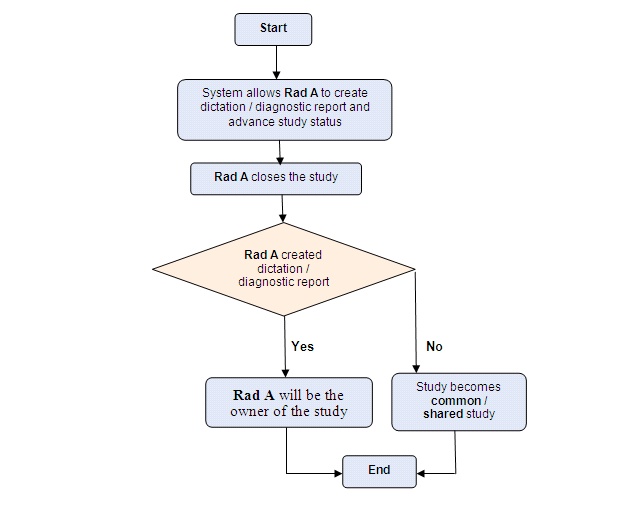
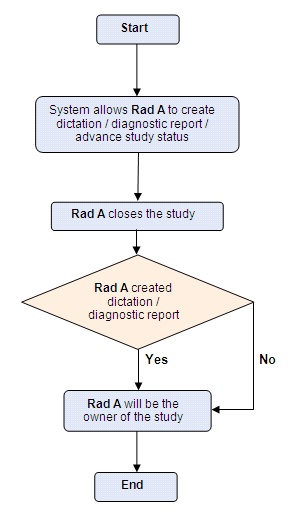
After logging into the system, a radiologist will be able to open an unassigned study of VERIFIED status. The system allows the radiologist to create a dictation or a diagnostic report and advance the study to the next level. The study is assigned to the radiologist the moment the diagnostic report/ dictation is created or if the study is advanced but not before. If the radiologist opens the study to view it but does not create a dictation/ diagnostic report, the study will be unassigned again.
Scenario 2
After logging into the system, a radiologist will be able to open a study of VERIFIED status which has been assigned to another radiologist. When the radiologist opens the study, the system will ask the radiologist if he/she wishes to take over the interpretation of the study.
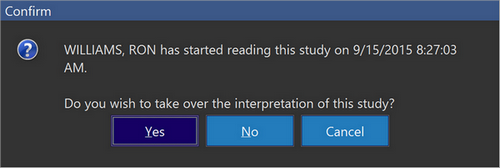
The radiologist has three options. The Radiologist can click Yes and take over the interpretation, click No or press Cancel.
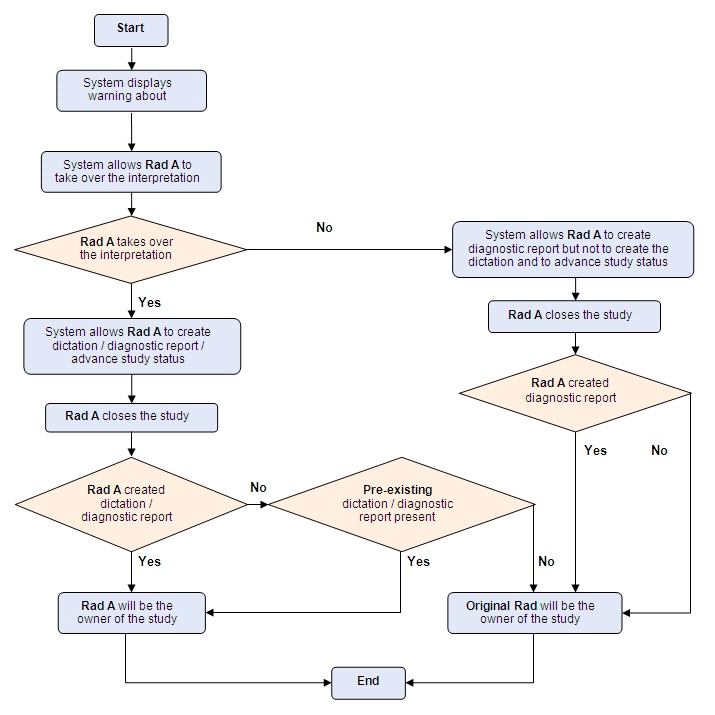
If the radiologist clicks yes to the message, dictations, diagnostic reports can be created and the study can be advanced. If at this stage the radiologist opens the study and creates a dictation, diagnostic report, the study will be assigned to the radiologist. If the radiologist decided to close the study without performing any operations on the study (i.e. create dictation, diagnostic report etc), the system will check for any pre-existing dictation/ diagnostic report in the study. If a pre-existing dictation/ diagnostic report is present, this current radiologist will become the owner of the study. If no pre-existing dictation/ diagnostic report is present and the current radiologist closes the study without performing any operation on it, the study ownership will be reverted back to the original radiologist (the radiologist who was the owner of the study originally).
If the radiologist clicks no to the message asking the radiologist if he/ she wishes to take over the interpretation of the study, the study can still be opened by the radiologist. The system allows this radiologist to create a diagnostic report but he cannot create a dictation in the report or advance the study as he/she is not the owner of the study. Once the current radiologist closes the study, the study ownership will be retained by the original radiologist.
Scenario 3
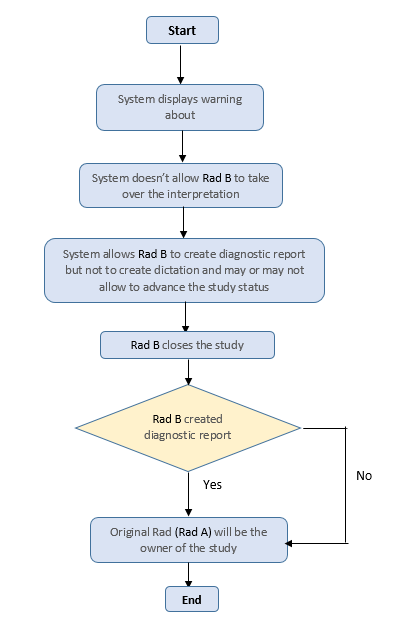
If a radiologist (RAD B) attempts to open another radiologist's (RAD A) study of VERIFIED status which is currently being read by its owner (RAD A), a warning will be displayed. It informs the radiologist (RAD B) that the study is owned by another radiologist (RAD A). If the other radiologist (RAD A) is currently viewing the study, the system will advise the new radiologist (RAD B) of this as well. The system will open the study for the second radiologist (RAD B) and allow the radiologist to create a diagnostic report for the study but it will not allow him/her to create a dictation and may or may not let the second radiologist (RAD B) to advance the study based on certain conditions. If the radiologist closes the study, the study ownership will remain with the original radiologist.
Advancing a Study
For this specific scenario, a user can see the  enabled on the study desktop (indicating that the study can be advanced) if either of the following conditions are met:
-
The Configuration entry "Show Checkmark For Study Players Only" is disabled and either
- user is an assigned personnel of the study and
- the status of the study is lower than "Unread" and the study meets the Workflow status transition rule (report and/or dictation) or
- user is an not an assigned personnel of the study (RAD B in this scenario) and
- user has role privilege "Can Sign Any Report", status is lower than "Unread", and the study meets the Workflow status transition rule (report and/or dictation)
- user is an assigned personnel of the study and
-
The Configuration entry "Show Checkmark For Study Players Only" is enabled,
- user is an assigned personnel of the study,
- the status of the study is lower than "Unread" and the study meets the Workflow status transition rule (report and/or dictation)
- user is an assigned personnel of the study,
Scenario 4
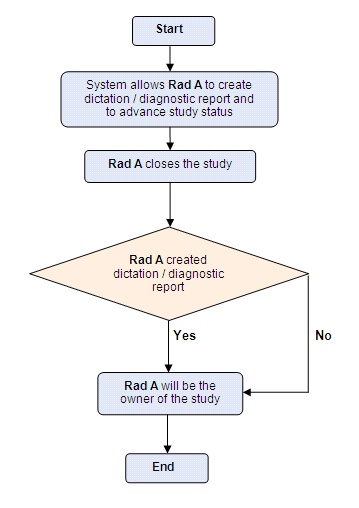
If a radiologist opens a study of VERIFIED Status which is owned by him (opening his own study), the system allows him to create dictations, create diagnostic reports or to advance the study to the next status. If he chooses to close the study without performing any of these options, even then the study will remain under his ownership.
Scenario 5
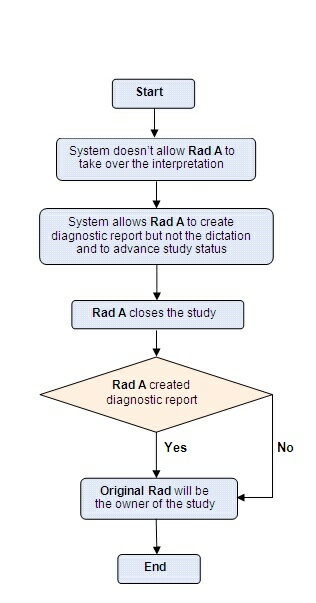
If a radiologist opens a study with a status higher than VERIFIED status but lower than READ status, which is owned by another radiologist and the original owner has signed the study, the system will allow the new radiologist to open the study. The system will allow the new radiologist to create a diagnostic report but it will not allow him to create a dictation or to advance the study status. When the new radiologist closes the study, the study will still be owned by the original radiologist.
Scenario 6
If a radiologist opens a study with a status higher than or equal to READ status, which is owned by another radiologist and the original owner has signed the study, the system will allow the new radiologist to open the study. The system will allow the new radiologist to create a diagnostic report but it will not allow him to create a dictation or to advance the study status. When the new radiologist closes the study, the study will still be owned by the original radiologist.
Scenario 7
If a radiologist opens a study higher than VERIFIED status (e.g DICTATED or SIGNED) owned by another radiologist and the study contains an unsigned report created by the original owner, the system will allow the new radiologist to open the study.
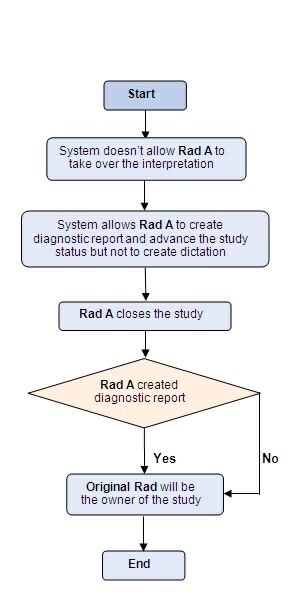
The new radiologist cannot take over the interpretation of the study although the system allows him to create a diagnostic report for the study. He cannot create a dictation or advance the study to the next level. When the new radiologist closes the study, the study will still be owned by the original radiologist.
Scenario 8
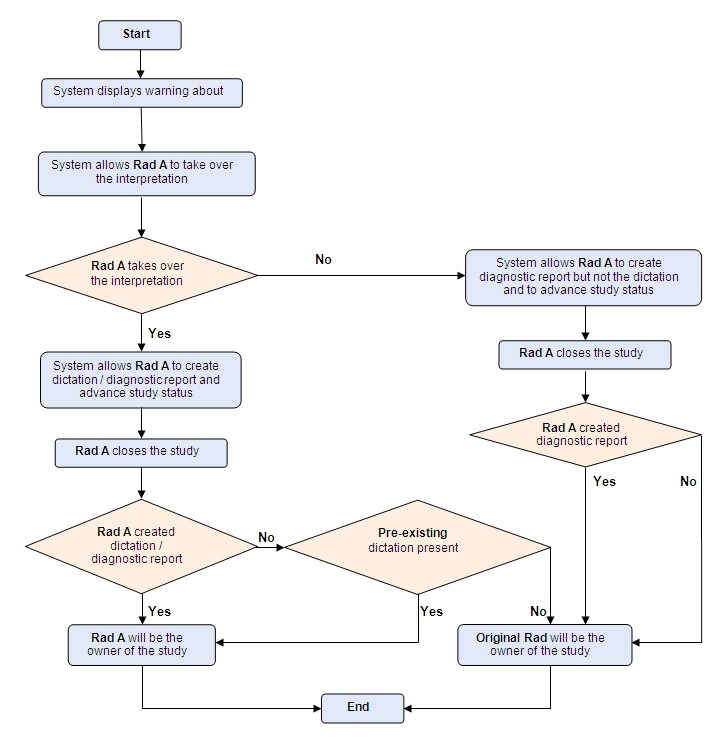
If a radiologist attempts to take over the ownership of a study higher than VERIFIED status (e.g DICTATED or SIGNED) owned by another radiologist, the system will check the study for any pre-existing diagnostic reports (the system check for existence of diagnostic reports only). If no diagnostic report exists, the system gives the new radiologist an option to takeover the interpretation of the study. At this moment if the new radiologist does not take over the interpretation, the system will allow her to create diagnostic reports but will not allow her to create a dictation or to advance the study to the next status. When the new radiologist closes the study, it will still be owned by the original radiologist.
However, if the radiologist takes over the interpretation of the study, the system will allow the new radiologist to create a diagnostic report, create dictation or to advance study status. After the new radiologist closes the study, the system will check the study for any new dictations created. If the new radiologist has created a dictation for the study, the study ownership will be transferred to her after the study closes. If no new dictations were created by the new radiologist, the system will check for any pre-existing dictations in the study. If the study contains any pre-existing dictations (created by the previous radiologist) the study ownership will be transferred to the new radiologist. If no pre-existing dictation is available and the new radiologist closes the study without creating a new dictation, the ownership of the study will be reverted back to the original radiologist.
Scenario 9
If a radiologist opens a study higher than VERIFIED status (e.g DICTATED or SIGNED) which is owned by him (opening his own study), the system allows him to create dictations, create diagnostic reports or to advance the study to the next status. If he chooses to close the study without performing any of these options, even then the study will remain under his ownership.
If a user with "Transcriptionist" User Type role opens a study that has been assigned to a different Transcriptionist, the message "You are opening a study that is assigned to user for transcription. Do you wish to take over the transcription of this study?" is displayed.
If the user clicks Yes, the current logged in user is auto assigned as Transcriptionist for the study. If the user clicks No, the existing Transcriptionist continues to be assigned to the study.
If the user clicks Cancel, the study does not open.
This behavior is seen only when the following conditions are met:
- The System Configuration entry "Maximum Study Status for Automatically Assigning Study Players" is set to 160.
- The System Configuration entry "Skip Reading Physician Assignment When Assigned as Other Player" is disabled.
Scenario 10
The status of the System Configuration entry "Skip Reading Physician Assignment When Assigned as Other Player" determines the study assignment rules. When this configuration entry is enabled or disabled, the following situations are possible:
With the System Configuration entry "Skip Reading Physician Assignment When Assigned as Other Player" enabled:
- If a user with all privileges enabled opens a study with no Reading Physician assigned and closes the study without making any changes, this user is not assigned as the Reading Physician or as any other study player.
- If a user with all privileges enabled opens a study with no Reading Physician assigned, records a dictation or creates a report and then closes a study then this user is assigned as the Reading Physician.
- If a user opens a study which has a different Reading Physician assigned to it, a study take over message is displayed.
- In this situation, if the user has all other privileges enabled except for the Reading Physician privilege, then this user is auto assigned to all the other roles (as a Performing Physician, Performing Technologist and Transcriptionist) once the study is opened.
With the System Configuration entry "Skip Reading Physician Assignment When Assigned as Other Player" disabled:
- If a user with all privileges enabled opens a study, the user is auto assigned to all the assigned personnel roles
Regardless of the System Configuration entry "Skip Reading Physician Assignment When Assigned as Other Player" being enabled or disabled, the following behavior can be seen:
- If a user with a Reading Physician privilege opens a study with currently no Reading Physician assigned to it and closes the study without making any changes, this user is not assigned as the Reading Physician for the study.
- If a user with a Reading Physician privilege opens a study with currently no Reading Physician assigned to it and records a dictation or creates a report and closes the study, then this user is assigned as the Reading Physician for the study.
- If a user opens a study which has a different Reading Physician assigned to it, a study take over message is displayed.
Disabling Automatic Assignment of Study Players
You can disable the automatic assignment of study players by meeting the following criteria:
- Setting up the value for the System Configuration entry "Maximum Study Status for Automatically Assigning" to "1".
- By disabling the System Configuration entry "Skip Reading Physician Assignment When Assigned".
When a user who is the assigned study player for a study opens the specific study, the study take over confirmation message is not displayed and the user is not allowed to take over the ownership of the study.
This is useful in situations where in the user opening a certain study is not necessarily the user who needs to be assigned to the study.