Advanced Query Settings
In the Query section of the Station List you can specify the mechanism the RamSoft software should use when performing DICOM queries.
-
Click Settings > Server Settings > Station List. Station List screen appears.
-
Click Query tab. The Query tab screen appears as shown below.
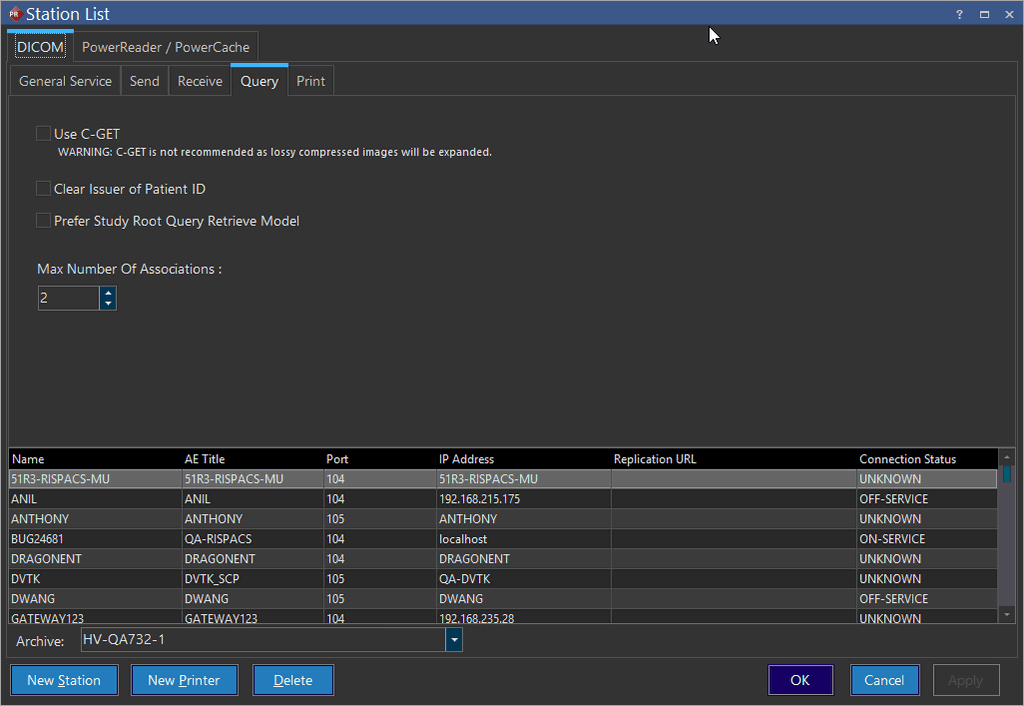
Query Tab
| Field Name | Description |
|---|---|
| Use C-GET | There are two possible DICOM query mechanisms C-GET and C-MOVE. C-MOVE is used by default. C-GET is not recommended as it is not supported by all DICOM devices. Moreover, lossy compressed images might be expanded if queried by C-GET. |
| Clear Issuer Of Patient ID | The Clear Issuer Of Patient ID option is used for clearing out the name of the issuer of Patient ID when the query is being requested. This option allows all C-Move requests to work with GE PACS on a site as GE PACS do not work well with requests which have the Issuer of Patient ID field filled in. The option is unchecked by default. |
| Prefer Study Root Query Retrieve Model | The Prefer Study Root Query Retrieve Model option is used with the C-Move query mechanism. It provides C-Move SCU the flexibility to select a preferred query model. The option is unchecked by default. |
| Maximum Number of Associations | The Maximum Number of Associations option allows higher efficiency and faster query of files. Through the use of multi-threading concept, it allows you to query studies through a number of threads, instead of only one thread. This increases the throughput of the system, ultimately decreasing the amount of time. |
| Archive | It allows you to select the name of the station list to be archived. |
The Station List (query tab) screen displays a list of all station names, its parameter such as AE Titles, Port numbers, IP Addresses, Replication URLs, and its Connection Statuses at the bottom of the screen.
- Do the necessary modifications in the fields explained above as per the requirement and click OK.