Allow a Viewing Protocol to Handle Studies from Multiple Scanners
You may often come across images which have originated from different sources. While the viewing protocol is capable of handling and displaying the images without any issues, there might be slight differences in the Series Description of the Series Matching criteria.
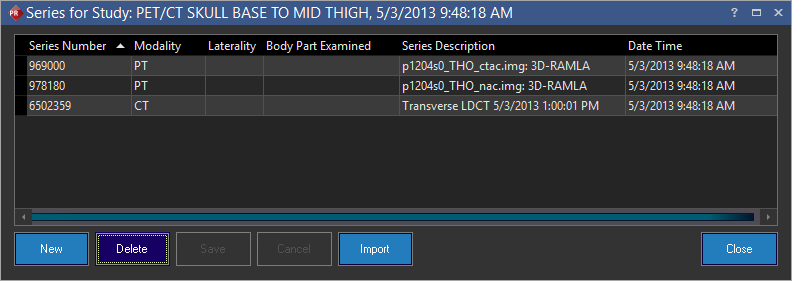
These changes can prevent the system from displaying similar Series with slightly different Series Descriptions. To avoid this issue, PowerReader can learn various protocol layouts from different sources and scanners. To do this, click Viewing Protocol Settings icon > Learn Protocol Layout on the Study Desktop. The system will generate a message stating that a separate series set has been added to the current protocol.

The system will create a separate Series Set. This new series set will contain the Series matching criteria with the slightly different Series Description.
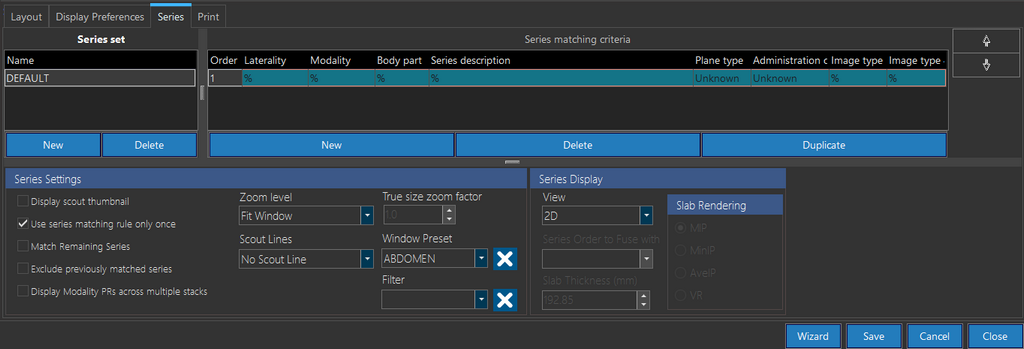
In this manner, a single hanging protocol can display and match images from multiple scanners. The Learn Protocol Layout option will apply the default series settings to both the viewable and non-viewable series of the study.
PowerReader will only save the protocol layout of the current studies in comparison mode. The series settings of the prior studies will be ignored. Also, if the images have the same scanner or different series set have been created to handle multiple scanners, the Learn Protocol Layout option will be disabled.
If you have made changes to an existing Viewing Protocol layout and want the system to learn the protocol layout, the following message is displayed when you click the Learn Protocol Layout option:

If you click Yes, the new Series is created with a layout that has the updated change to the Viewing Protocol. If you click No, a new Series is created ignoring the changes made to the layout of the existing Viewing Protocol.