Patient Questionnaire
The Patient Questionnaire is a Study level template that displays the Study details and Patient Demographic details along with Family History based on a set of pre-defined questions.
Most of the basic patient demographics information is populated by default in the Patient Questionnaire data sheet when launching the study for the first time. Information entered by the user is saved and is displayed whenever the study is opened.
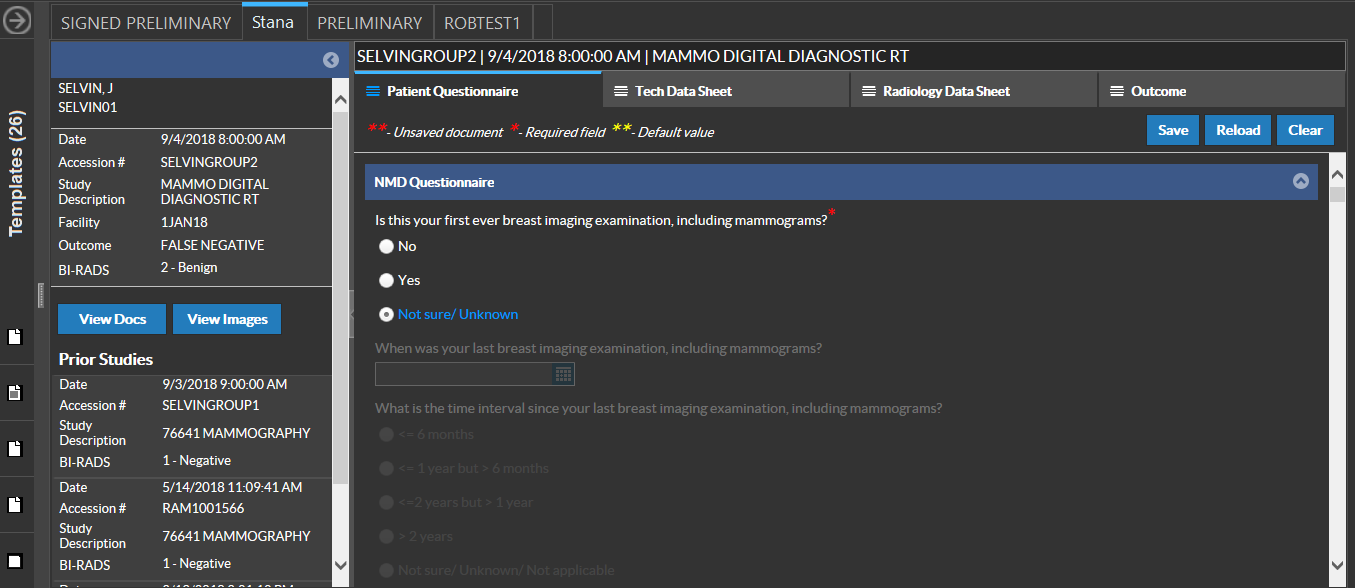
The questions that can be included in a Patient Questionnaire template can be customized for each facility and different versions of the template can be maintained for reuse.
Enter the appropriate information based on the feedback from the patient. Save entries by clicking the Save button. The message "Answers Saved Successfully" indicates that save has been complete. Once the questionnaire is saved, the saved date is loaded whenever the Stana tab is opened.
Clear all entries by clicking the Clear button. Reload the screen by clicking the Reload button.
RELATED TOPICS: