Scheduling a Biopsy And Assessing Outcome
The Outcome Data Sheet can be used to report the Pathology and schedule a Biopsy. This can be useful in informing the patients and follow up on biopsies.
A Biopsy can be scheduled once pathology results are obtained.
-
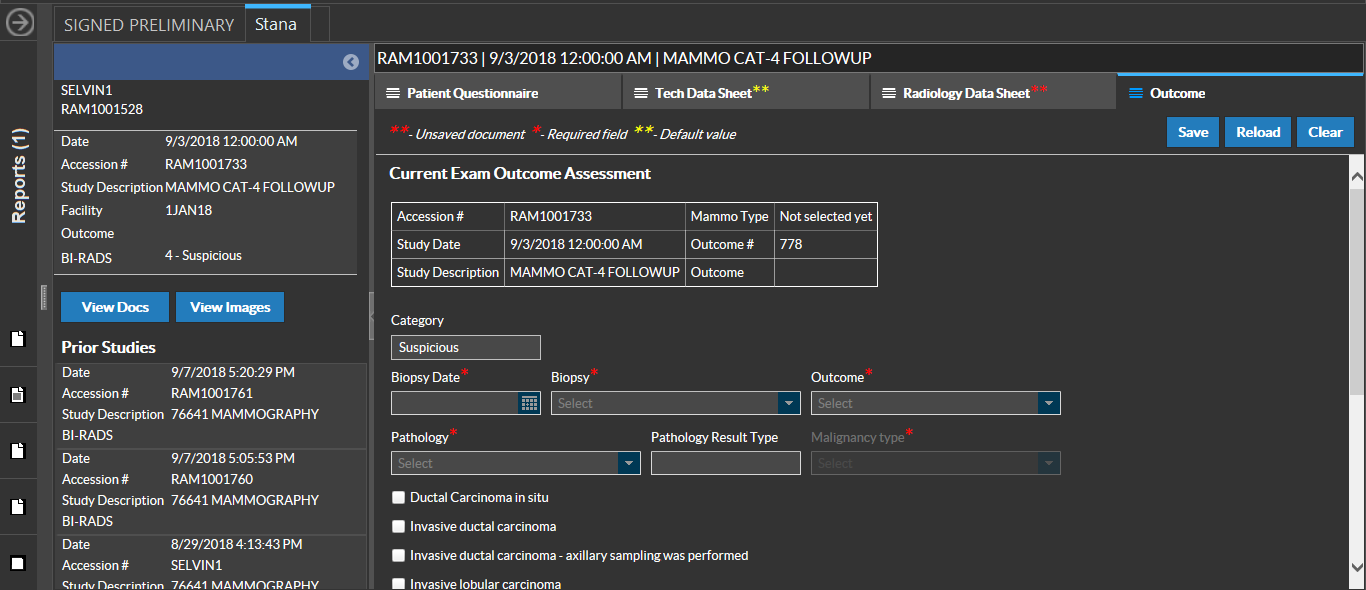
In the document viewer of the Stana study, on Stana tab, click on Outcome. You can see that a Unique Outcome number is assigned to the study.
-
Enter the Biopsy Date.
-
Enter the Biopsy Type.
-
Enter the Pathology results of the Biopsy.
Note: When the pathology result is selected, the system will indicate if the result is Malignant, Benign or High Risk
-
Enter the Outcome of the exam. If Malignant, select TRUE POSITIVE (TP). If Benign, select FALSE POSITIVE (FP).
-
Look for any specific findings in the pathology report. If any of these are present, select them by clicking the checkbox.
-
Based on the Facility policy, select any applicable follow-ups for a post biopsy result.
Note: If there is no Followup required, you can disable scheduling a followup exam by entering "0" in the Followup text field or by leaving it blank.
-
Add any additional information in Notes.
-
Click Save. You will see the message "Your changes have been saved".
If a follow up study is created, the following information regarding the followup study along with the follow up time interval is displayed:
- Status
- Priority
- Notes
- Modality
- Body Part
- Laterality
- Referring Physician
- Procedure Code
- Study Date Time
There can be instances when a facility does not receive a pathology result for a number of reasons. These are generally referred to as "Lost to follow-ups". In this case, it is important to document in the Notes field the cause of the lost follow up.

RELATED TOPICS: