What are Patient Level Documents?
Patient Level documents are specific documents containing information about a patient. The purpose of creating a patient level document is that the facilities can have patient data stored not only at the study level but also at the patient level where they can view specific patient information such as Patient Registration forms, Insurance cards etc. The patient level documents have been divided into the following types:
- HIPAA Consent Form
- Patient Insurance Cards
- Medical Record Release Forms
- Patient Registration Forms
The Non-Diagnostic reports will be visible with a dark blue icon while diagnostic reports will be represented by a light green icon. A white icon represents the absence of any diagnostic reports. When the Document button is clicked, the Document Viewer will open up.

There are two tabs in the Document navigator, the Documents tab and the Templates tab. The Documents tab displays all the documents stored under the selected study.
The Templates tab allows the user to select the templates to use. The templates are uploaded from Template Manager. To use the templates, double-click on the name of the template you want. Patient level templates have a check mark next to them. This will allow users to enter data into the template and save the template under the heading Patient Documents. The bookmarks in the template will automatically populate if the required information has been filled out in the Patient Registration form.
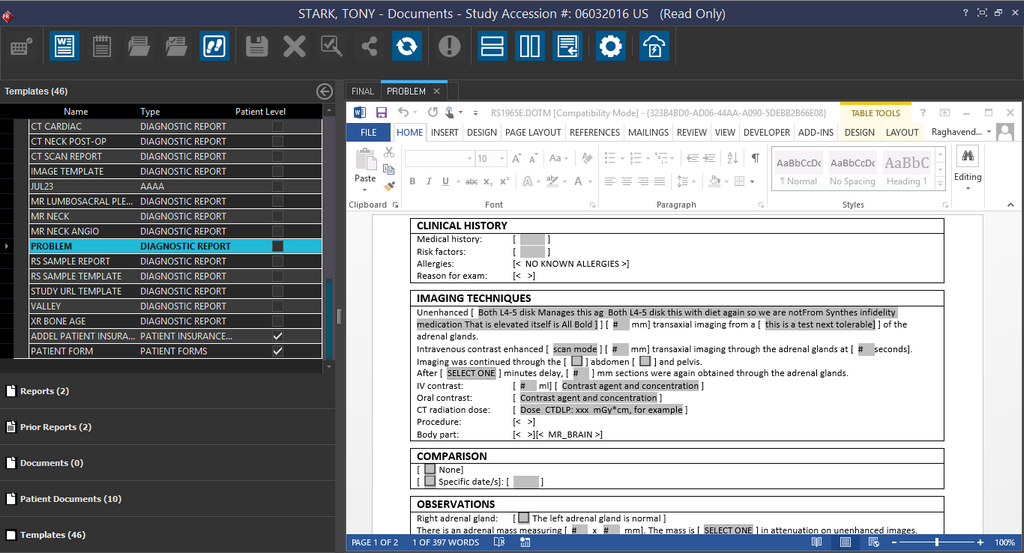
Once the template has been chosen, drop it on the left side of the divider. Both Patient Level and Study level document types are separated from each other in the Document Viewer. In the image below, the document contains a few study level and patient level documents. Each type of patient level document is separated as well e.g. insurance card or patient registration form.The document details can be collapsed or expanded by clicking on the -/+ sign in the grid on the left.
Once the patient level document has been created, it will be available for all studies of the patient. If any Patient Level documents have been received from another system, it might result in duplicate documents. Hence the system has been designed to filter out any "duplicate" documents which may arise via DICOM sending and receiving.
When studies are sent to another station through DICOM protocol, an option has been provided to send patient level documents with it. The option is available in the Station List form's Send tab.
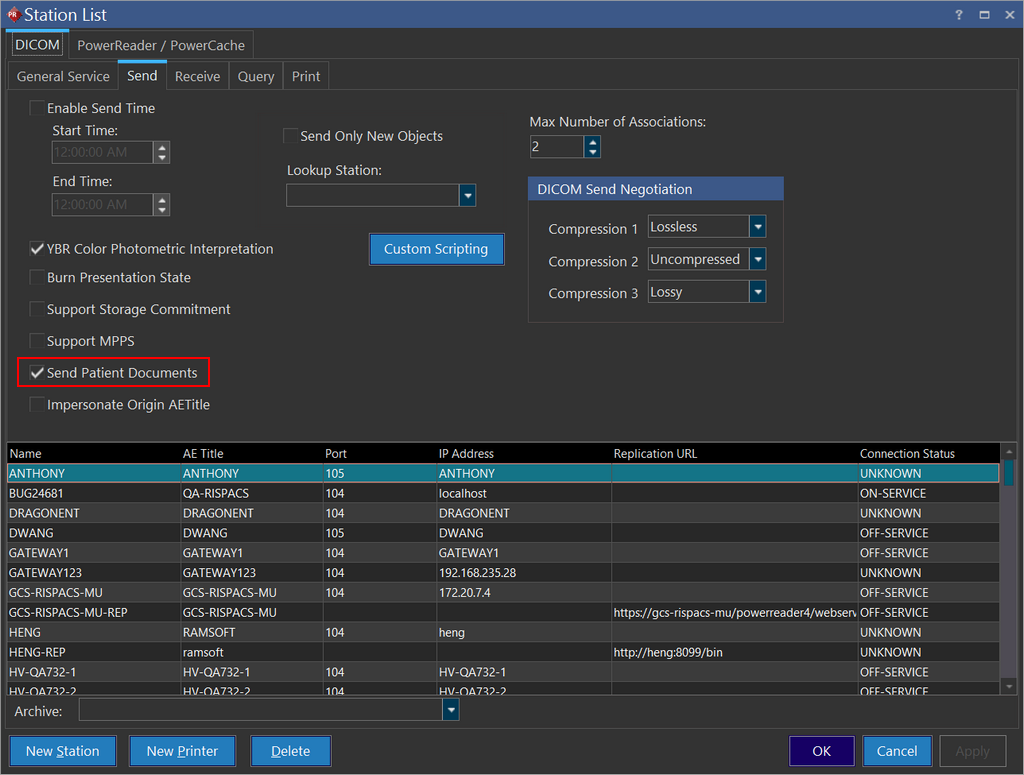
In the Send tab, the Send Patient Documents option is toggled on by default. Send Patient Documents option allows patient level documents to be sent to a specified station. This option allows all patient level documents to be queried and sent. If the DICOM object does not belong to the current study, it will be sent from the study it belongs to. For example, if the Patient level documents are available in some other study of the patient, these documents will be sent from the other study along with the current study.
The Transmit log will log this event. If two studies are being sent as described above, it will display two studies being sent (one entry for the current study and one entry for the Patient Level document).
If a study with Patient Level documents is deleted, the patient level documents are moved to another existing study of that patient (this study will be the most recent study of the patient). If the user decides to delete the last study of a patient, and that study has Patient Level documents attached with it, those documents will be deleted with the said study. The same rules will apply with the Rules Based Purging service task to prevent accidental loss of Patient Level documents.
When the study is being burnt to disc, the CD viewer will only burn Diagnostic reports. Patient Level Documents will not be burned to the disc.