Toggling the Annotations on/off
When study images are displayed in RapidResults, they can be overlaid with annotations. These annotations display various DICOM tags, such as Patient Name and Patient ID. By default, the software displays a default set of annotations over each image, in order to associate each image with its series, study and patient. You can click on the Annotations tool  to toggle the display of overlaid annotations in RapidResults.
The following image shows an image with and without overlaying Annotations displayed.
| With Annotations | Without Annotations |
|---|---|
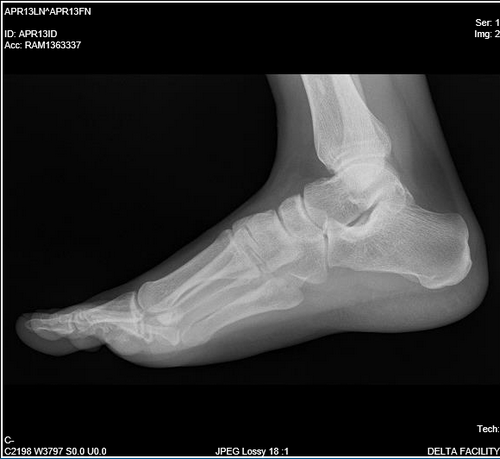 | 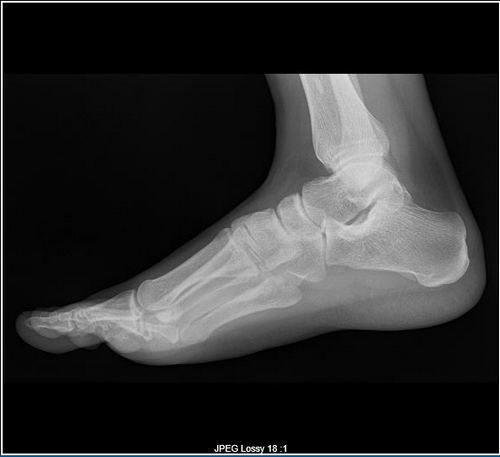 |
Stylus/Touch screen Users
Touch the Toggling the Annotations on/off tool to toggle the display of Annotations in RapidResults.
Related Topics:
- Date/Time Annotations Overlays
- Scrolling Through The Images
- Adjusting Window Level
- Using the Zoom Tool
- Moving an Image in a Frame
- Using Measuring Tools
- Flip and Rotate Images
- Inverting Grayscale Values of an Image
- Linking Images in Different Series
- Viewing Localizer Lines Over Images
- Adjusting Window Settings using Clamp Mode
- Resetting Manipulated Images
- Working with Images and Series