Inverting Grayscale Values of an Image
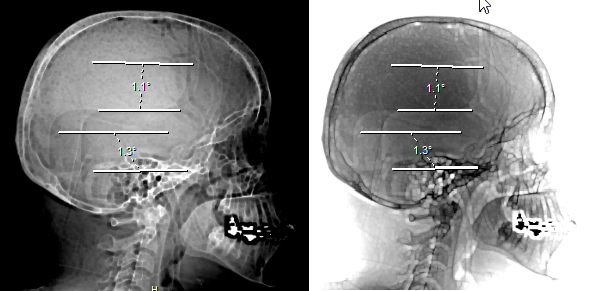
The Invert image  tool is used to reverse the grayscale values of an image. Applying the Invert Image icon will make the white areas appear black and the black areas appear white.
It can be very useful to clarify areas of CR and x-ray images.
Clicking this icon will invert the grayscale values of the selected image. Clicking it again will change them back to the original values. The following is an example of the same image before and after the Invert Image icon is applied.
Stylus/Touch screen Users
Touch the Invert Image tool to reverse the grayscale values of an image.
Related Topics:
- Scrolling Through The Images
- Adjusting Window Level
- Using the Zoom Tool
- Moving an Image in a Frame
- Using Measuring Tools
- Flip and Rotate Images
- Linking Images in Different Series
- Toggling the Annotations on/off
- Viewing Localizer Lines Over Images
- Adjusting Window Settings using Clamp Mode
- Resetting Manipulated Images
- Working with Images and Series