Linking Images in Different Series
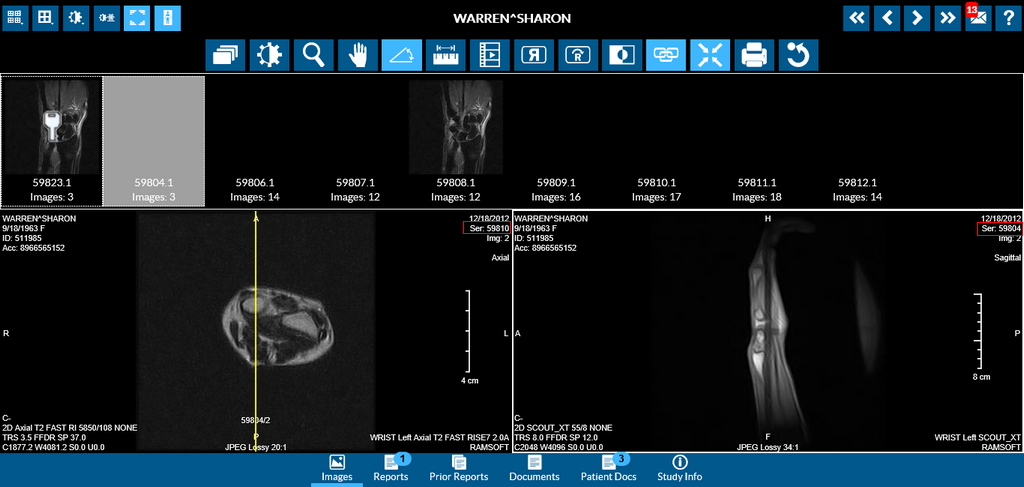
The Linking tool  links images across the currently visible series that are in the same plane and additionally links the slice positions as well. Scrolling through any one of the series will result in the linked series scrolling along with it. Furthermore, if the linked series do not have the same number of images, scrolling will be performed on selected viewport images and all the linked viewports by synchronizing the images based on the position relative to the current slice of the selected viewport. In this way the system will automatically determine the scrolling intervals in order to always display the images that are related to the closest image based on location.
The following is an image of a study with the link icon selected. Notice that these are two different series being linked.
Stylus/Touch screen Users
Touch the Link tool to activate linking.
Related Topics:
- Scrolling Through The Images
- Adjusting Window Level
- Using the Zoom Tool
- Moving an Image in a Frame
- Using Measuring Tools
- Flip and Rotate Images
- Inverting Grayscale Values of an Image
- Toggling the Annotations on/off
- Viewing Localizer Lines Over Images
- Adjusting Window Settings using Clamp Mode
- Resetting Manipulated Images
- Working with Images and Series