Viewing Localizer Lines Over Images
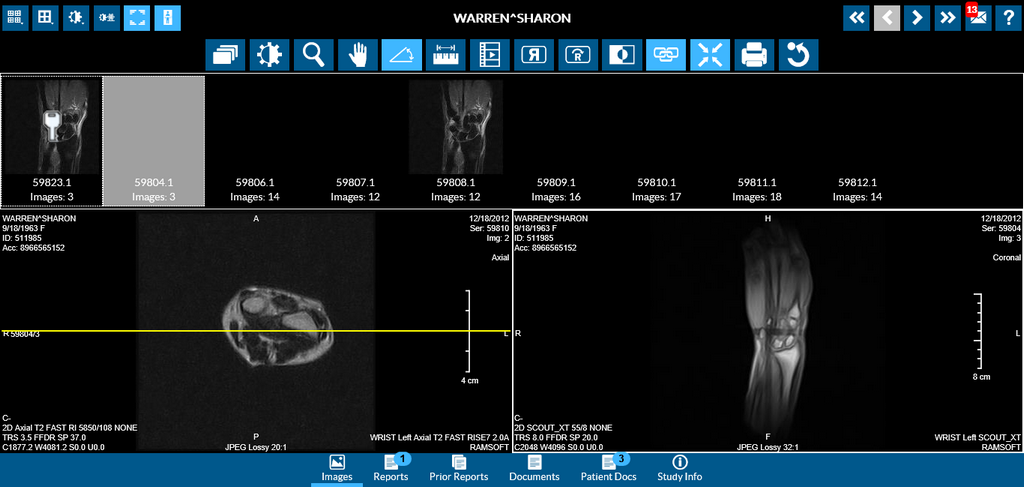
Localizer line  (also called Scout Lines). Any exams that contain spatial information can be viewed with Scout Lines overlaying the images. Scout Lines reference other orthogonal images in the study. While you scroll to other images in the series, the localizer line will move accordingly. Click on the localizer line tool to toggle the display of localizer line in RapidResults.
Note: The localizer lines will be visible only if it was drawn during the study. The following image shows what Localizer Lines look like.
Stylus/Touch screen Users
Touch the Localizer Line tool to toggle the display of localizer line in RapidResults.
Related Topics:
- Scrolling Through The Images
- Adjusting Window Level
- Using the Zoom Tool
- Moving an Image in a Frame
- Using Measuring Tools
- Flip and Rotate Images
- Inverting Grayscale Values of an Image
- Linking Images in Different Series
- Toggling the Annotations on/off
- Adjusting Window Settings using Clamp Mode
- Resetting Manipulated Images
- Working with Images and Series