Key Objects
The Key Object Repository is used to summarize the most important objects of a study in one place. Any object placed in the Key Object Repository becomes a Key Object. These objects are always displayed first when a study is opened and can come from different series.
Key Objects are created by clicking on the Create Key Object Document  icon. This button is located in the top toolbar of the Study Desktop.
The Key Object Repository is shown below:
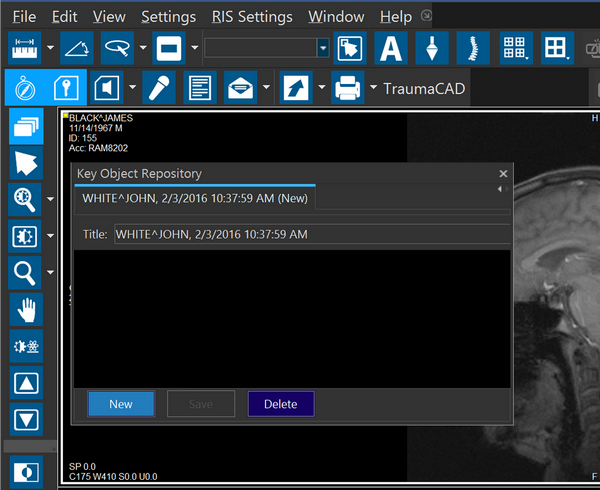
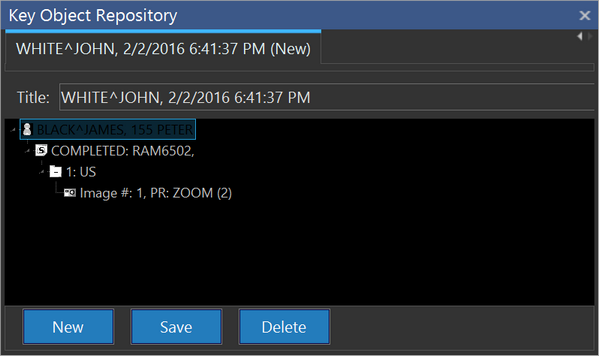
The Key Object Repository displays all of the Key Object Documents that are associated with the study. The different documents can be accessed by using the tabs along the top of the window. If there is no description given for the key object, no description will be displayed under Series Info or Patient Explorer for that Key Object.
Clicking on the Key Object in the Key Object Repository will allow the user to view the image.
 Key Objects are labeled with a key icon in the top left corner of the viewport.
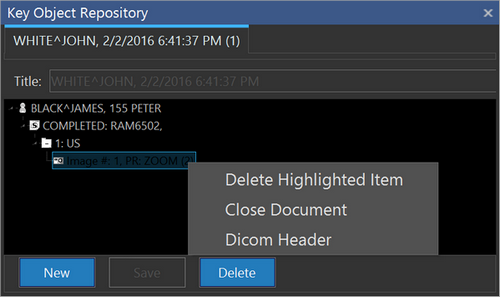
The right-click menu of the Key Object Repository contains the following options:
- Delete Highlighted Item - removes the object from the Key Object Document
- Close Document - closes the Key Object Repository
- Dicom Header - opens the DICOM Header of the study
Objects displayed in the Key Object Repository have the same notation as the Patient Explorer.
Printing Key Object Series
To group images together for printing, you can create a Key Object series, select the images in the series and print the selected images. See Printing Key Object Series.