Immunization Information
Entering Immunization Information
-
Select a Patient and click the Patient Info icon. On the Patient Info form, navigate to the Health Information tab.
-
Click New in Immunization group to add the immunization details such as Vaccine Date, Immunization Date, Vaccine. The application will automatically display the CVX Code. The Vaccine Date, Vaccine fields are mandatory.
-
Enter the Amount, number of the units, and the Manufacturer. The application will automatically display the MVX code.
-
Once the Lot Number has been entered, enter the name of the Administrator and other relevant fields.
-
Add remarks in Notes for future references if necessary.
-
Click Apply to save your data. To send the immunization record to the health authority, click the Submit button.
A message is displayed showing that a request has been submitted from the current patient information to the Immunization Information System. This means that immunization details have been sent to the Government Health Department through HL7.
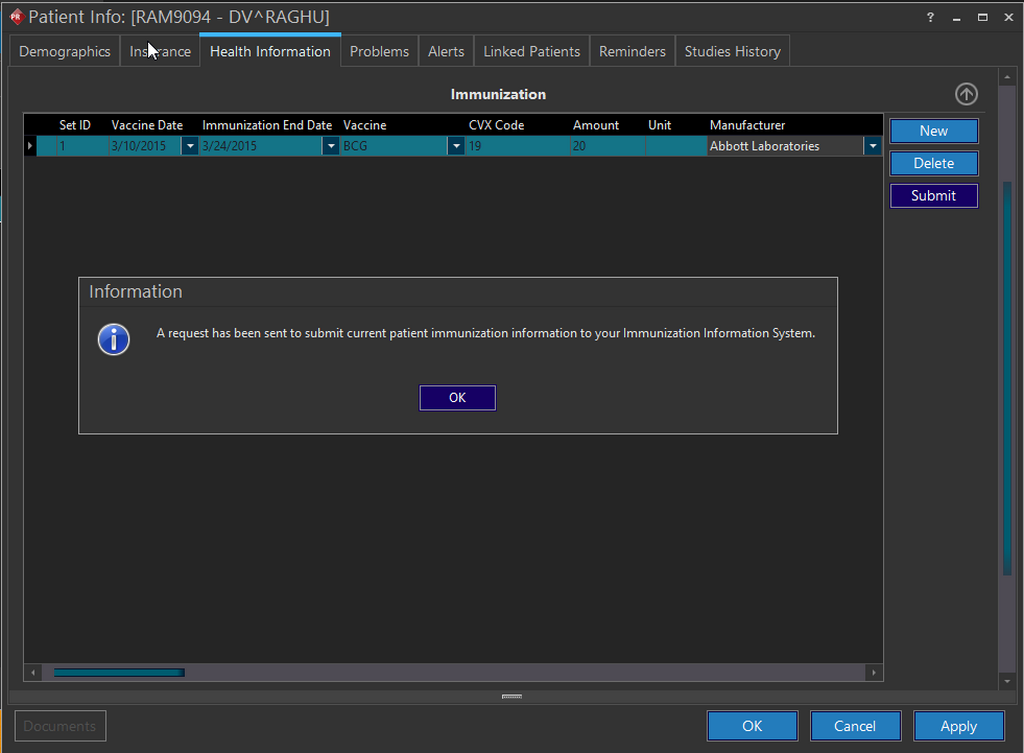
- Click OK.
This Meaningful Use feature is available in RamSoft PowerServer only with Meaningful Use license.