Email Templates
The Email Templates section is used to create templates for Email reminders and acknowledgments.
Editing Email Templates
Select RIS Settings > Email Settings > Email Template Settings.
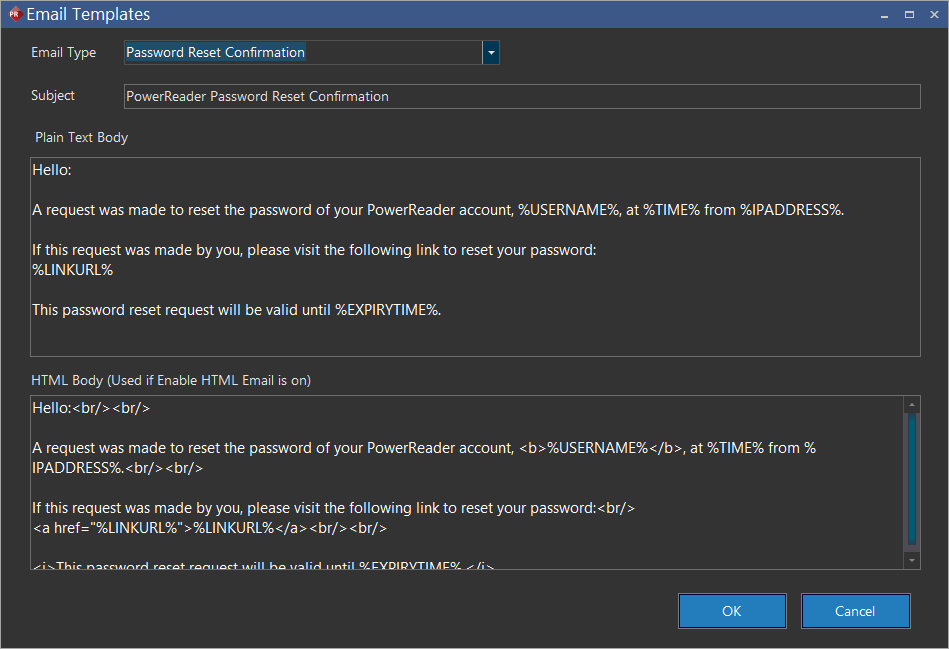
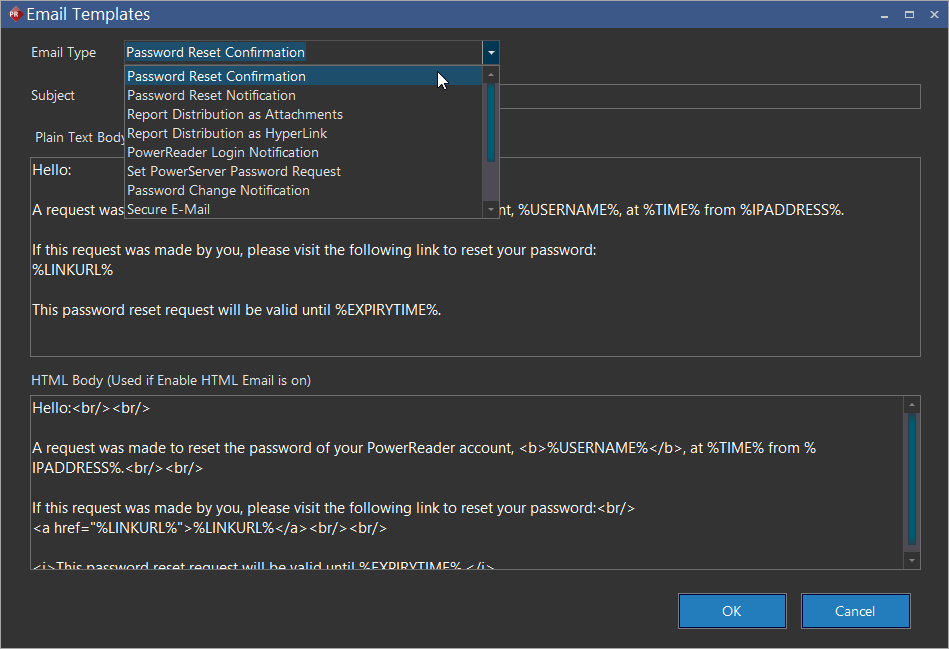
The following are customizable email templates for different types of emails. Currently there are eight types of templates:
- Password Reset Confirmation
- Password Reset Notification
- Report Distributions as Attachments
- Report Distribution as Hyperlinks
- PowerReader Login Notification
- Set PowerServer Password Request
- Password Change Notification
- Secure E-mail
- HealthVault Acknowledgment.
- Lab Result Education Resource and
- Diagnosis Education Resource
There are four fields in the template window:
| Field | Description |
|---|---|
| Email Type | The type of email |
| Subject | The Subject/Title of the email |
| Plain Text Body | The plain text version of the email |
| HTML Body | The HTML version of the email |
The templates use Macros to display information in the Email body.
Macros for password reset confirmation and password reset notification
The following are the macros used for Password Reset Confirmation and Password Reset Notification templates:
| Field | Description |
|---|---|
| %EXPIRYTIME% | The expiry time of the password reset request. This is used for the Password Reset Confirmation template. |
| %IPADDRESS% | IP address of the user who requested the password reset. |
| %LINKURL% | This link directs to the site where it allows the user to change the password. This is used for the Password Reset Confirmation template. |
| %TIME% | The current time of the system when the email was sent. |
| %USERNAME% | The username of the account needed to reset the password. |
Macros for report distribution as attachments
The following are the macros used for Report Distribution as Attachments:
| Field | Description |
|---|---|
| %RECIPIENTNAME% | The name of the recipient of the email |
| %REPORTTITLE% | The title of the report being sent |
| %PATIENTNAME% | The name of the patient |
| %ACCESSIONNUMBER% | The Accession number of the study |
| %STUDYDATETIME% | The date and time of the study |
| %STUDYDESCRIPTION% | The description of the study in the Study Info form |
Macros for report distribution as hyperlinks
The following are the macros used for Report Distribution as Hyperlinks:
| Field | Description |
|---|---|
| %REPORTLINK% | The URL link that would navigate to the Login Portal page. Once the user logs in, the study would launch in RapidResults |
| %REPORTTITLE% | The title of the report being sent |
| %PATIENTNAME% | The name of the patient |
| %ACCESSIONNUMBER% | The Accession number of the study |
| %STUDYDATETIME% | The date and time of the study |
| %STUDYDESCRIPTION% | The description of the study in the Study Info form |
Macros for PowerReader Login Notification
The following are the macros used for PowerReader Login Notification:
| Field | Description |
|---|---|
| %USERNAME% | The username used to log into Login Portal |
| %TIME% | The time at which the username was created |
| %IPADDRESS% | The Internet Protocol address from which the username was issued |
| %SERVERURL% | The URL of the PowerReader Login Portal |
| %LINKURL% | The URL of the PowerReader password page. This will take the user to a page where the user can change/retrieve password (if forgotten) |
| %EXPIRYTIME% | The time limit after which this request to change password will expire |
Macros for Set PowerServer Password Request
The following are the macros used for Set PowerServer Password Request:
| Field | Description |
|---|---|
| %USERNAME% | The username used to login into the software |
| %TIME% | The time at which the username was created |
| %IPADDRESS% | The Internet Protocol address from which the username was issued |
| %SERVERURL% | The URL of the PowerServer login page |
| %LINKURL% | The URL used to change the password. It will take the user to a page where the user can change the system generated password (if forgotten) |
| %EXPIRYTIME% | The time limit after which this request to change password will expire |
Macros for Password Change Notification
The following are the macros used for Set PowerServer Password Change Notification:
| Field | Description |
|---|---|
| %USERNAME% | The username used to login into the software |
| %TIME% | The time at which the password was changed |
| %IPADDRESS% | The Internet Protocol address from which the password was changed |
| %TIME% | The time at which a request to change the password was received |
| %LINKURL% | The URL used to change the password. It will take the user to a page where the user can change the system generated password (if forgotten) |
| %EXPIRYTIME% | The time limit after which this request to change password will expire |
| %USERNAME% | The username of the account whose password will be changed |
| %IPADDRESS% | The Internet Protocol address from which the request to change the password was received |
Macros for Secure Email
The following are the macros used for Secure Email:
| Field | Description |
|---|---|
| %PATIENTNAME% | The name of the patient whose study will be viewed |
| %STUDYDESCRIPTION% | The description of the study which will be viewed |
| %STUDYDATETIME% | The date and time of the study |
| %LINKURL% | The URL link which will take the user to the login page for the study |
| %PORTLINKURL% | The URL link which will take the user to the login page of RapidResults |
| %COMMENTS% | Any comments the user might want to add |
Macros for HealthVault Acknowledgment
The following are the macros used for HealthVault Acknowledgment:
| Field | Description |
|---|---|
| %PATIENTNAME% | The name of the patient whose information is being sent |
| %FACILITY% | The name of the Facility/Provider sending the information |
| %WELCOMEURL% | The URL used to connect to the HealthVault account |
| %FACILITYADDRESS% | The address of the facility sending the information |
| %FACILITYPHONE% | The phone number of the facility sending the information |
| %FACILITYEMAIL% | The email address of the facility sending the information |
Macros for Patient Problem Education Resource
The following are the macros used for Patient Problem Education Resource:
| Field | Description |
|---|---|
| %PATIENTNAME% | The name of the patient whose study will be viewed |
| %LINKURL% | The URL link which will take the user to the login page for the study |
Macros for Lab Result Educational Resource
The following are the macros used for Lab Result Educational Resource:
| Field | Description |
|---|---|
| %PATIENTNAME% | The name of the patient whose study will be viewed |
| %LINKURL% | The URL link which will take the user to the login page for the study |
Macros for Diagnosis Education Resource
The following are the macros used for Diagnosis Education Resource:
| Field | Description |
|---|---|
| %PATIENTNAME% | The name of the patient whose study will be viewed |
| %LINKURL% | The URL link which will take the user to the login page for the study |