Problem Codes
Problem Codes are used to group and identify diseases, disorders, symptoms, and medical signs.
Click RIS Settings > Problem Codes. The screen displays a list of existing codes and its details. Note that this option is available only with the PowerServer RIS or Tele Plus license enabled.
Use the screen to create, view or edit existing problem codes.
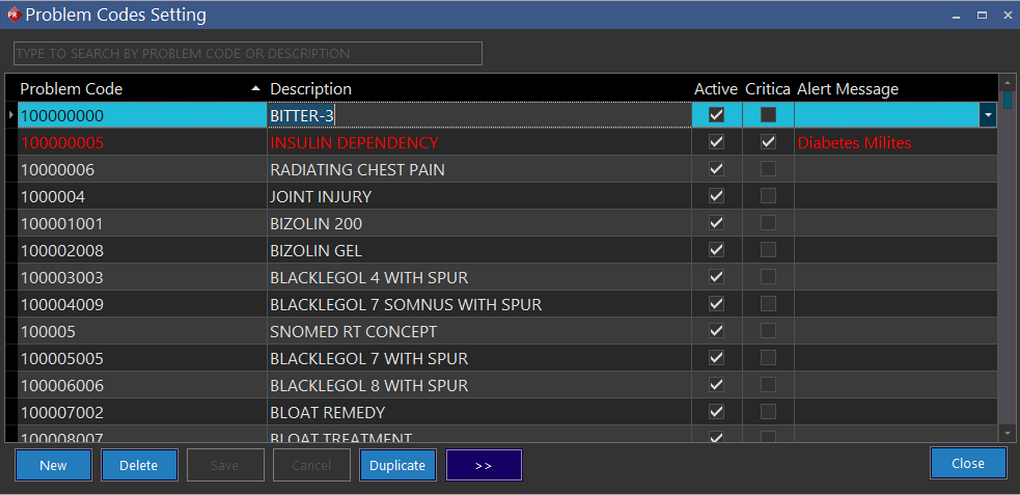
- Click New. A new row is added to the existing list.
- Type the identification code in the Problem Code text field.
- Type the name of the problem in the Description text field.
- Ensure the Active checkbox is checked.
- Select the Critical checkbox to set a flag if the diagnosis code is crucial.
- Click Alert Message text field to type a note on the criticality/complications. Red indicates that the Problem Code entered holds top priority. This can be viewed by all Reading Physicians, Performing Physicians, Performing Technologists and Transcriptionists by default.
- Click Save to save the changes.
- The Problem Codes can be duplicated or deleted with the Duplicate and the Delete buttons available at the bottom of the form.
note
The Retrieve next set of Records  button helps you move to the next set of Problem Codes to avoid scrolling down when you have a large number of Problem Codes.