Physician Specialty
The Physician Specialty option allows different types of Referring Physicians to have a specialty. Once configured, these specialties are available in the Users, Referrers and Providers tabs of the Users and Facilities menu. By default, more than twenty physician specialties are configured in the application. More can be created based on the business demand.
Creating a Physician Specialty
- Click RIS Settings > Physician Specialty.
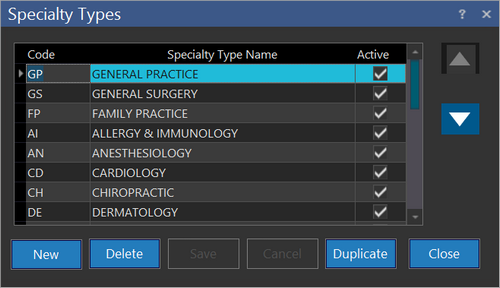
- Click New.
- Type the unique identification code under the Code column.
- Type the specialty name under the Specialty Type Name column.
- Ensure the Active checkbox is checked.
- Click Save.
A physician specialty can be rendered inactive by un-checking the Active checkbox. Upon deactivation, the physician specialty will not be available while choosing the specialty of a referring physician. Pressing Delete deletes the specialty permanently.
The order of physician specialties can be moved up/down in the list by clicking the  or
or  buttons.