Insurance Payers
This feature allows users to assign the Insurance Company to the patient under the Insurance Plans available in Study Info. Users can assign many Insurance Plans for each Insurance Payer.
Create a New Insurance Payer
- Click RIS Settings > Insurance Payers.

- Click New. Insurance Company Information screen is displayed.
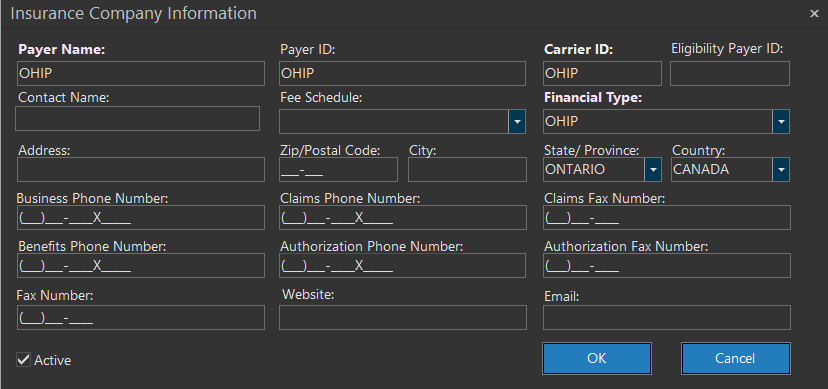
- Fill in all the fields found in Insurance Company Information screen. The Fee Schedule for the Insurance Payer is set here. See Fee Schedule Assignment Diagram for more details. Note that the all fields can be set to be mandatory if needed, in the
InsuranceCompanyForm.config file. If the Carrier ID field is not mandatory, when entering the Payer Name, the system assigns a Carrier ID. If this field is mandatory, a message prompting to enter a valid Carrier ID is displayed. - Ensure the Active checkbox remains checked. Only then will the insurance company information be available while choosing an insurance payer for the patient.
- Click Save.
Edit an existing Insurance Payer
- Select the name of the insurance payer from the existing list.
- Click Edit. Upon click, the Insurance Company Information screen opens in edit mode displaying the selected insurance payer information.
- Do the necessary modifications and click Save.
The Active check mark is used to activate or it section focuses only on the RIS-enabled features in the Patient Registration form. Please see the section Patient Information for information on the universal features.
The Active checkmark is used to activate or deactivate a particular insurance payer. Upon deactivation, the insurance payer information will not be available while choosing an Insurance payer for the patient.
The Insurance Payer Information is required to submit electronic claims to an insurance carrier when there is an interface to a billing software/clearing house. Payer ID is used by CMS1500 (USA only) to identify the payer/insurance companies for electronic claim remittances. The Carrier ID is utilized to identify the insurance payer within the organization. It can also be utilized for field mappings when submitting data via HL7 protocol to a billing software. The Eligibility Payer ID field is used to store the value for Insurance company's Eligibility payer ID which is useful while checking for eligibility.
Deleting an existing Insurance Payer
Note: Insurance payer information/company cannot be deleted if one or more patients is associated it.
- Select the name of the insurance payer to be deleted from the existing list.
- Click Delete and Yes to confirm the deletion.