Patient Reminder Templates
The Patient Reminder Templates section is used to create templates for Patient Reminders. Patient reminders are sent to patients through email.
How to create a new Patient Reminder Template
- Click RIS Settings > Patient Reminder Template.
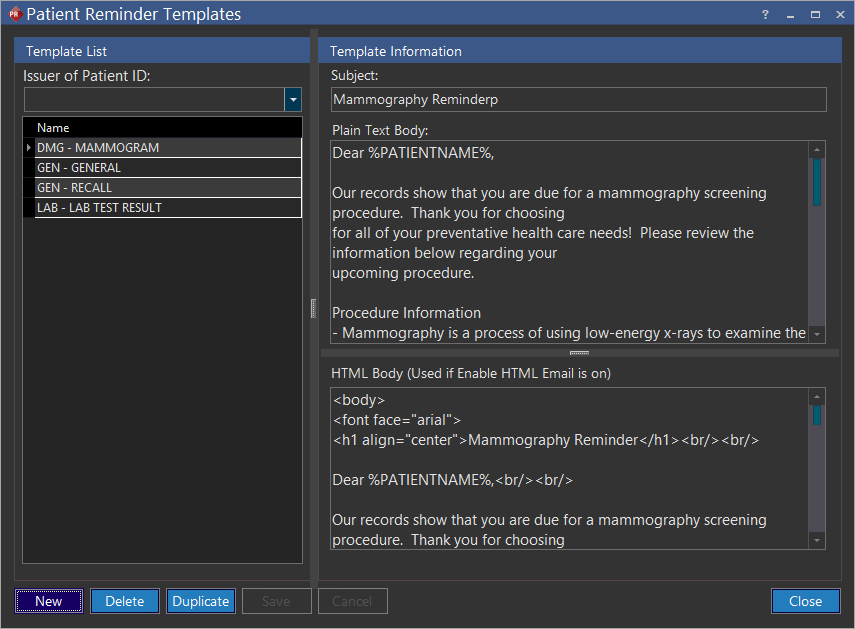
- Click the Issuer of Patient ID drop-down menu and select the Issuer of Patient ID. The newly created patient reminder template will then be available. Templates created without any specific Issuer of Patient ID are available for patients belonging to any facility.
- Click New.
There are six predefined specific categories. These categories are denoted by the first three letters in the name of each template. The categories are listed below
- General - GEN
- Medication - MED
- Problem - PRB
- Lab Test - LAB
- Medication Allergy - AGY
- Demographics - DMG
While these categories have been defined by the Meaningful Use Criteria, users can define their own categories. The content of the reminder should be entered in the "Plain Text Body" and the "HTML Body" section of the form.
- Type the name of a category (predefined/new) in the text field found below Name.
- Type a caption on the Subject text field. This field is mandatory.
- Type the content of the reminder in the Plain Text Body text field.
- Type the content of the reminder in the HTML Body text field if enable HTML Email is on.
- Click Save.
Duplicating an existing Patient Reminder Template
If business needs require a new template that is similar to an existing template, the duplicate feature can be utilized.
- Select the name of the template to be duplicated.
- Click Duplicate.
- Make the necessary modifications in the required fields and click on the newly created (duplicated) template name available on the list.
- Rename the template and click Save.
Deleting an existing Patient Reminder Template
- Select the name of the template which is outdated or not required.
- Click Delete and YES to confirm deletion.
- Click Save.