Fee Schedules
Fee Schedules denote the compensation for services rendered or to be rendered. Fee structures to be levied from the patient can be created for:
- Each billable procedure and modality with which one or more studies are performed, and
- Each facility.
For different procedures and modalities, an option is available to assign a specific amount as a charge:
- Click Settings > Users and Facilities > Imaging Facilities tab.
- Click Facility Override Fee Schedule or Facility Override Self-Pay Fee Schedule drop-down menu. The fee schedule chosen here will be used by the facility.
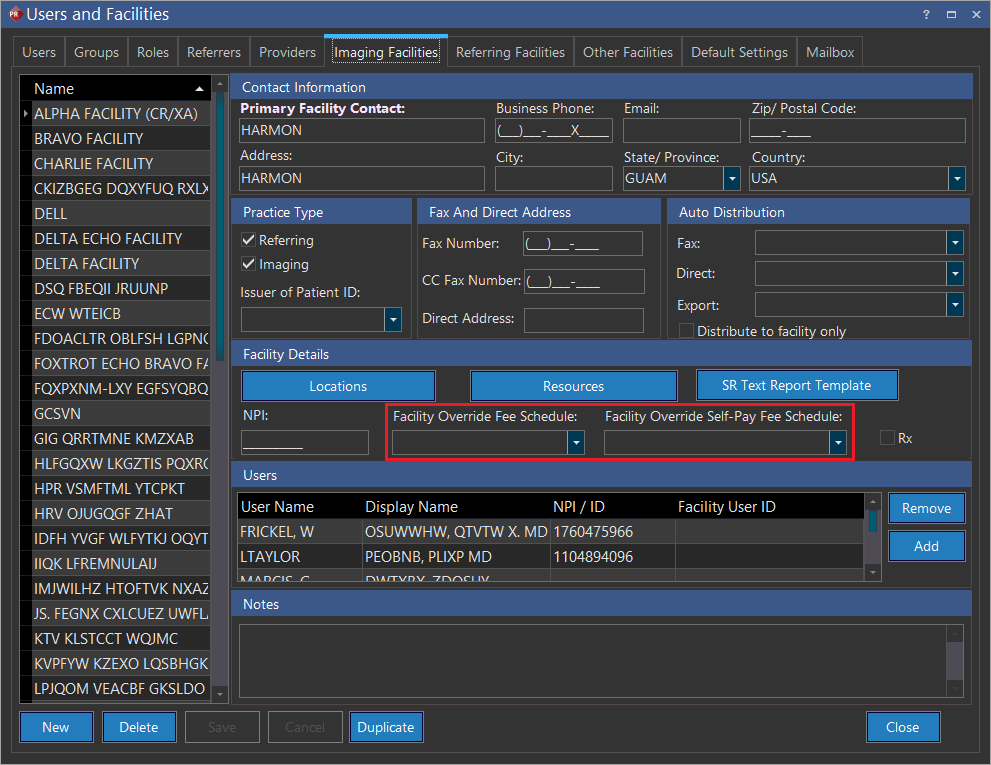
The fee schedule can be customized through RIS Settings > Fee Schedules. Fee schedules are classified into three subtypes based on their nature of service.
- Procedure Fee Schedule
- Modality Fee Schedule
- Default Fee Schedule
Rules for assigning a fee schedule
The system assigns the fee schedules depending on whether the patient is self-pay or has active primary insurance (Commercial, OHIP, etc.).
-
If the patient is NOT self-pay (i.e the patient is insured) the system follows the following rules:
a. The system first assigns the Facility Override Fee Schedule of the imaging facility.
b. If a Facility Override Fee Schedule has not been defined for the imaging facility, the system assigns the Insurance Fee Schedule defined for the Active insurance of the patient. If the study date falls between Effective From and the Effective To date of the active insurance, that insurance's Fee Schedule is assigned to the study.
c. If an Insurance Fee Schedule has not been defined for the Active insurance then the system assigns the Default Fee Schedule to the study.
-
If the patient IS a self-pay patient, the system follows the following rules:
a. The system searches for the Facility Override Self-Pay Fee Schedule. If the schedule is available, the system assigns it to the study.
b. If the Facility Override Self-Pay Fee Schedule is not available, the system assigns the Default Self-Pay Fee Schedule to this Self-Pay patients.
-
After an active insurance has been assigned to a patient, the system will not allow the user to change the patient's financial type to "Self-Pay". A warning message informs the patient that the patient has an active insurance defined for him.
-
The Default Fee Schedule tab informs the patient that the "Facility Override Fee Schedules takes higher priority than Default Fee Schedules".
The fee schedule assignment can be best described with the help of the diagram in section Fee Schedule Assignment Diagram.