Default Fee Schedule
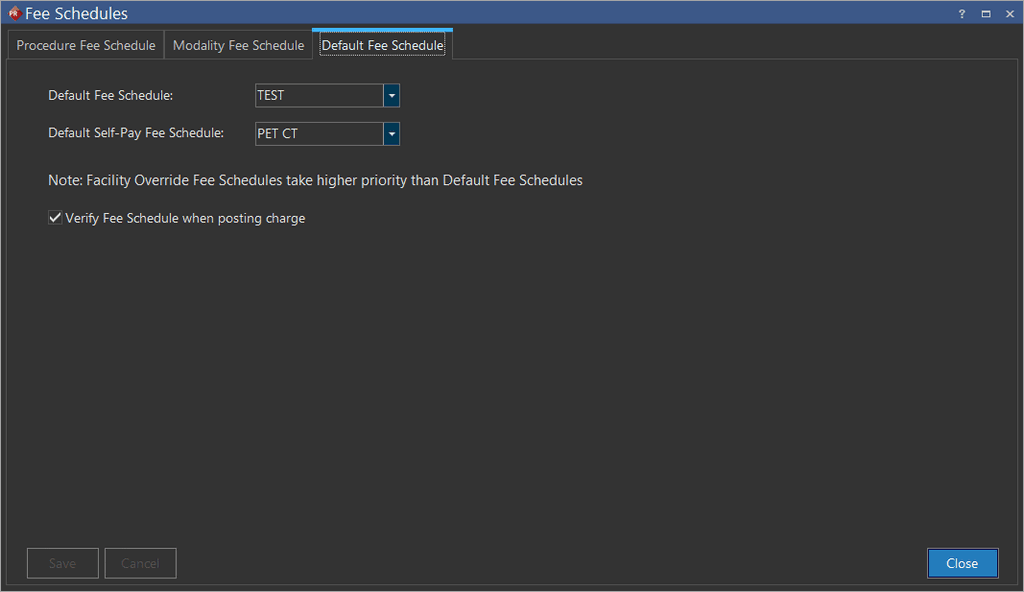
Whatever type of fee schedule selected/assigned in Default Fee Schedule drop-down menu under Default Fee Schedule tab of Fee Schedules screen is considered as default fee schedule. It is a type of fee schedule which is utilized as an alternative, if Facility Override Fee Schedule type is not defined in Imaging Facilities tab.
note
Facility Override Fee Schedules holds higher priority than Default Fee Schedules.
How to create a Default Schedule
- Click RIS Settings > Fee Schedules. The Fee Schedules screen is displayed. By default, the Procedure Fee Schedule tab is displayed.
- Click the Default Fee Schedule tab.
How to select or assign a Default Fee Schedule
- Click the Default Fee Schedule dropdown and select the appropriate fee schedule.
- Click the Default Self-Pay Fee Schedule dropdown and select the appropriate self-pay fee schedule.
- Check the Verify Fee Schedule when posting charge checkbox if you wish to verify the charge while posting.
note
The option Verify Fee Schedule when posting charge allows the system to check the Procedure Code and modifier combination in Study Info whenever you post a charge. If the option is unchecked, the system will not check the Procedure Code and Modifier combination whenever you post a charge.
- Click Save and Close.